
Quick answer
Git merge combines branches and preserves their existing commit history. Git rebase moves or replays commits onto a new base, creating a more linear history while changing the commit IDs.
Use merge for shared or public branches when you need to preserve history. Rebase is better suited to updating your own local feature branch before sharing it. If you’re unsure which to choose, merge is generally safer because it doesn’t rewrite existing commits.
Git merge and rebase at a glance
- History: Merge keeps the original branch structure, while rebase creates a linear sequence.
- Commit IDs: Merge preserves existing commit IDs. Rebase creates replacement commits with new IDs.
- Collaboration: Merge is safe for shared branches, but rebase needs more care on published branches.
- Conflicts: Either operation can cause conflicts. A merge usually requires one round of conflict resolution, while a rebase may stop at several commits.
- Result: Merge may create a merge commit. Rebase doesn’t create one for the work it replays.
- Best fit: Merge highlights historical context, whereas rebase favors a readable, linear history.
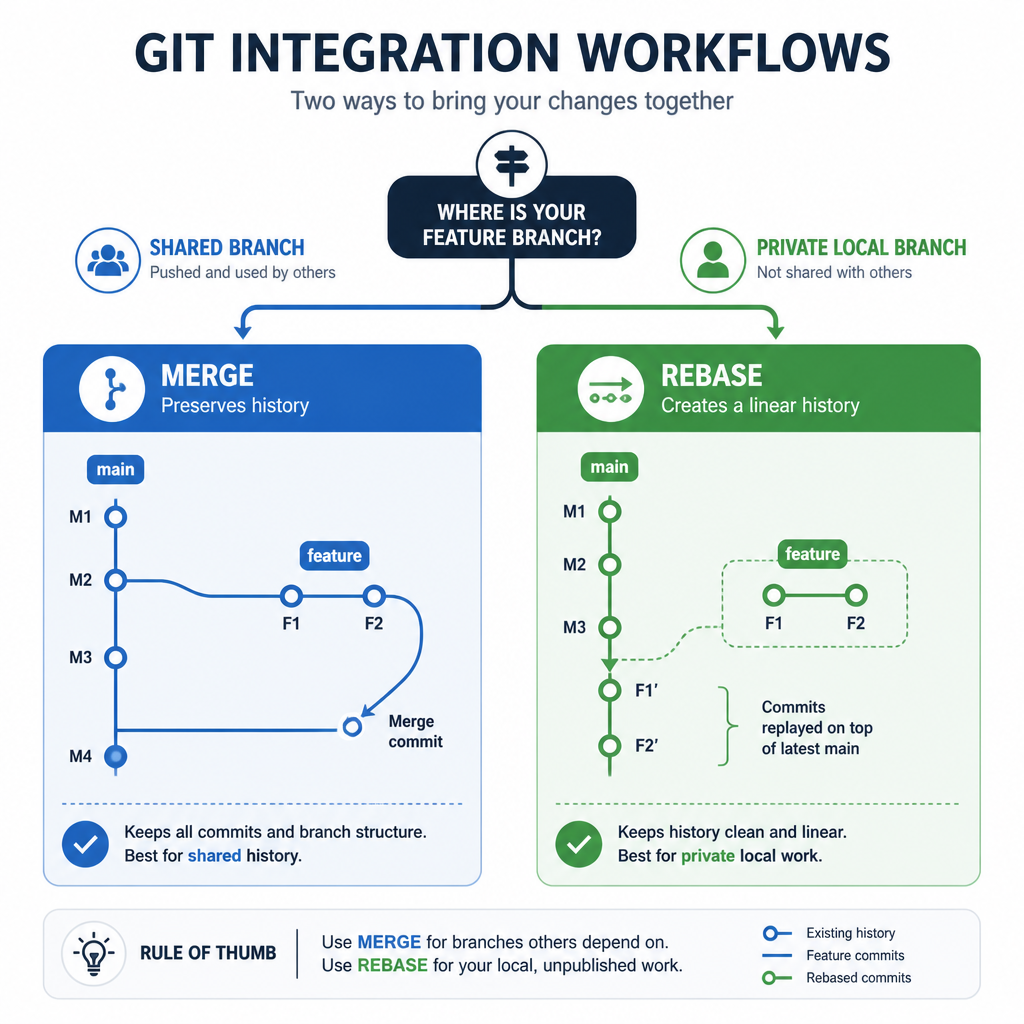
How Git merge works
Suppose main has moved forward while you’ve been working on feature. You can switch to the feature branch and merge the latest version of main into it:
git switch feature
git merge main
When both branches have unique commits, Git normally creates a merge commit with two parents. None of the existing commits are changed.
A---B---C  main
     \   \
      D---E---M  feature
Commit M marks the point where the two histories were combined. If the branches haven’t diverged, Git may use a fast-forward instead and won’t create a merge commit.
Advantages of merge
- It doesn’t rewrite existing commits.
- The original branch and integration history remains visible.
- It works safely with branches that other people have already fetched.
- You can easily identify when a feature was integrated.
Disadvantages of merge
- Frequent merges can make the commit graph more difficult to read.
- Routine branch synchronization may produce many merge commits.
- Noisy history can complicate reviews and debugging.
How Git rebase works
Rebase takes the commits unique to your current branch and replays them on top of another commit. To update a local feature branch with main, run:
git switch feature
git rebase main
The branched history becomes a linear sequence:
Before:
A---B---C  main
     \
      D---E  feature

After:
A---B---C---D'---E'  feature
D' and E' contain changes corresponding to the original commits, but they’re new commits with different hashes. Unless another reference still points to the originals, those commits become unreachable.
Advantages of rebase
- It produces a clean, linear history.
- It avoids merge commits created only to keep a feature branch up to date.
- Code review, log inspection, and commit-by-commit debugging may become easier.
- With interactive rebase, you can reorder, combine, edit, or remove local commits.
Disadvantages of rebase
- It rewrites commit history and changes commit hashes.
- Using it on a shared branch can disrupt other collaborators.
- You may need to resolve similar conflicts across several replayed commits.
- If the old history has already been pushed, you’ll usually need to force-push the replacement history.
When to use merge
Choose merge if the branch is shared, historical context matters, or your team uses a merge-based workflow. It’s especially suitable for integrating completed features into a protected main branch.
One common workflow looks like this:
git switch main
git pull --ff-only
git merge --no-ff feature
git push origin main
The --no-ff option tells Git to create a merge commit even if a fast-forward is possible. Some teams use it to keep feature boundaries visible in the history. This is a policy choice, though, not a requirement for every repository.
When to use rebase
Rebase works well when you’re cleaning up or updating a private feature branch before opening or merging a pull request. It keeps temporary synchronization commits out of the finished history.
git fetch origin
git switch feature
git rebase origin/main
If you previously pushed the feature branch and no one else is using it, update the remote branch with:
git push --force-with-lease origin feature--force-with-lease is safer than --force because it refuses to overwrite remote changes you weren’t expecting. Even so, it still rewrites the remote branch. Only use it when your team’s collaboration rules permit that.
How conflict handling differs
During a merge, resolve each conflicted file, stage it, and then complete the merge:
git status
git add path/to/resolved-file
git commit
A rebase stops at the individual commit that conflicts. After resolving and staging the files, continue the operation:
git status
git add path/to/resolved-file
git rebase --continue
You may have to repeat these steps if later commits also conflict. To abandon the operation and return the branch to its state before the rebase, run:
git rebase --abortTo cancel a merge that hasn’t been completed, use:
git merge --abortThe safest practical rule
Rebase your own unpublished work, and merge work that has already been shared. It isn’t an absolute technical restriction, but following this rule prevents a common collaboration problem: replacing commits that other developers are already using as the basis for their work.
Your team should also document whether pull requests use merge commits, squash merging, or rebase merging. These repository-level settings shape the final history regardless of how developers update their local branches.
Frequently asked questions
Does rebase delete commits?
Rebase creates replacement commits and moves the branch reference to them. The original commits are no longer part of that branch’s history, though they may remain recoverable for a while through git reflog.
Is Git rebase better than merge?
Neither option is better in every situation. Rebase is useful for keeping local history linear, while merge is safer for collaboration and retains the original topology of development.
Can I rebase after pushing?
Yes, but it changes history and normally requires a force push. Don’t rebase a pushed branch if other people may have based their work on it. When rewriting has been approved, use git push --force-with-lease rather than a standard force push.
Does rebase cause fewer conflicts than merge?
Not necessarily. Both operations have to reconcile incompatible changes. Because rebase applies commits one at a time, it can stop more than once. A merge usually presents conflicts based on the combined state of the branches.
What is interactive rebase?
Interactive rebase lets you edit a series of local commits before replaying them. For example, git rebase -i HEAD~3 allows you to reorder, squash, reword, or remove the last three commits. Use it before those commits are shared.
