
You can convert a CSV file to JSON in Python without installing extra packages. The built-in csv.DictReader maps each row to the column headers, while json.dump writes those records as a JSON array.
import csv
import json

with open("customers.csv", newline="", encoding="utf-8-sig") as source:
    rows = list(csv.DictReader(source))

with open("customers.json", "w", encoding="utf-8") as destination:
    json.dump(rows, destination, indent=2, ensure_ascii=False)
For ordinary files, this approach works well. Large exports are better suited to JSON Lines, which lets you write one record at a time instead of loading the whole CSV into memory.
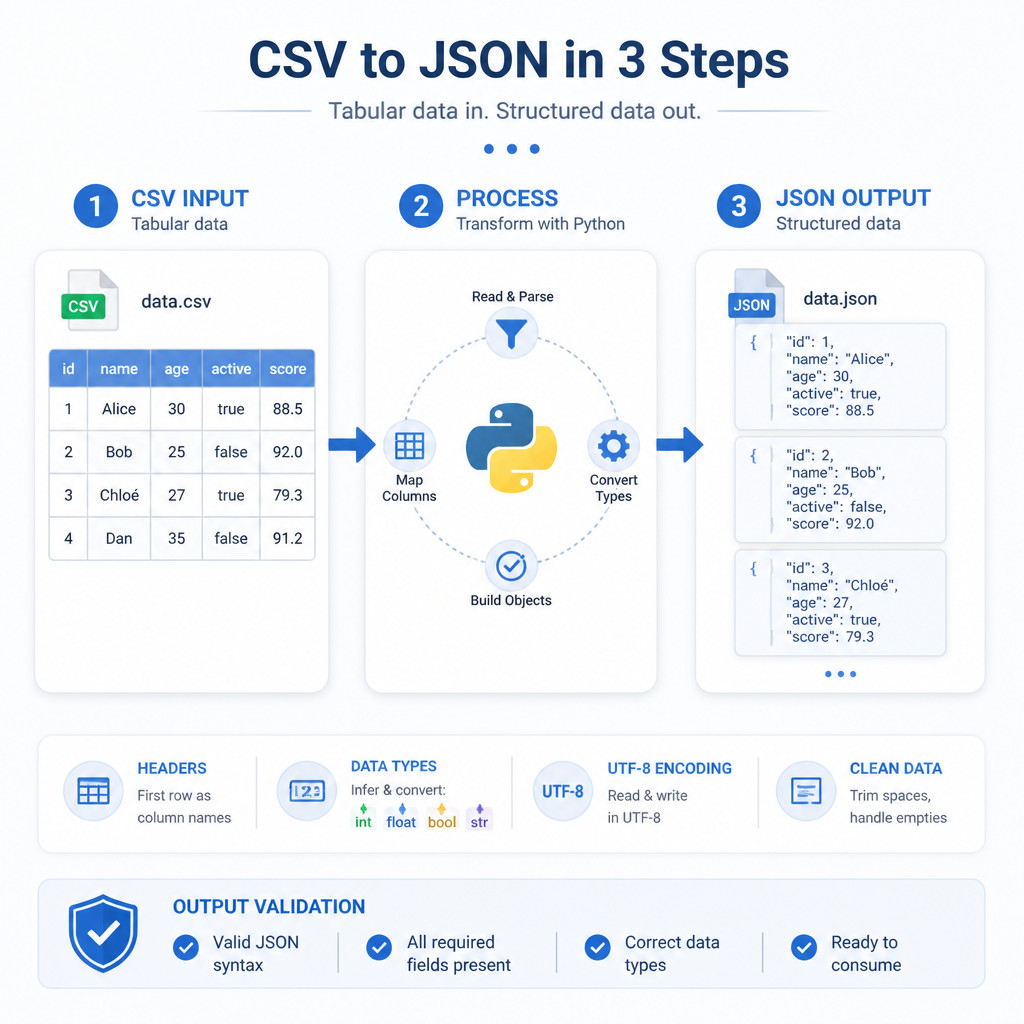
Example CSV and JSON output
Suppose customers.csv contains the following data:
id,name,country
101,Ana,Spain
102,Noah,Canada
After conversion, the JSON looks like this:
[
  {
    "id": "101",
    "name": "Ana",
    "country": "Spain"
  },
  {
    "id": "102",
    "name": "Noah",
    "country": "Canada"
  }
]
The first row of the CSV supplies the property names. Every row after it becomes a separate JSON object.
Build a reusable CSV-to-JSON script
This version accepts the input and output filenames as command-line arguments. Save the script as csv_to_json.py.
import argparse
import csv
import json

parser = argparse.ArgumentParser(description="Convert CSV to JSON")
parser.add_argument("input", help="Input CSV file")
parser.add_argument("output", help="Output JSON file")
parser.add_argument(
    "--json-lines",
    action="store_true",
    help="Write one JSON object per line"
)
args = parser.parse_args()

with open(args.input, newline="", encoding="utf-8-sig") as source:
    reader = csv.DictReader(source)

    if not reader.fieldnames:
        raise ValueError("The CSV file does not contain a header row")

    with open(args.output, "w", encoding="utf-8") as destination:
        if args.json_lines:
            for row in reader:
                destination.write(
                    json.dumps(row, ensure_ascii=False) + "\n"
                )
        else:
            json.dump(
                list(reader),
                destination,
                indent=2,
                ensure_ascii=False
            )
Run it on Windows, macOS, or Linux with this command:
python csv_to_json.py customers.csv customers.jsonIf your system uses a separate command for Python 3, run:
python3 csv_to_json.py customers.csv customers.jsonConvert CSV to JSON Lines or NDJSON
JSON Lines, also known as NDJSON, stores one complete JSON object per line. It works well for large datasets, bulk imports, log-processing systems, and other tools that handle records incrementally.
Use the script’s option like this:
python csv_to_json.py customers.csv customers.ndjson --json-linesThe resulting file contains:
{"id": "101", "name": "Ana", "country": "Spain"}
{"id": "102", "name": "Noah", "country": "Canada"}
A complete NDJSON file isn’t a single JSON value, unlike a regular JSON array. Instead, each line is valid JSON on its own.
Preserve numbers, booleans, and null values
CSV doesn’t include standard type information, so DictReader returns every field as a string. An ID written as 101, for example, becomes the JSON string “101” rather than the number 101.
It’s safer to convert known columns explicitly instead of guessing the types of values throughout the file:
def convert_types(row):
    row["id"] = int(row["id"])
    row["price"] = float(row["price"])
    row["active"] = row["active"].strip().lower() in {
        "true", "1", "yes"
    }
    row["notes"] = row["notes"] or None
    return row
Apply that function as you read the records:
rows = [convert_types(row) for row in reader]Only convert an empty field to null when that meaning fits the dataset. The destination system may treat an empty string differently from a missing value.
Handle semicolon-separated and tab-separated files
Some regional exports separate fields with semicolons rather than commas. In that case, set the delimiter yourself:
reader = csv.DictReader(source, delimiter=";")For tab-separated values, use:
reader = csv.DictReader(source, delimiter="\t")Don’t parse rows manually with str.split(). Python’s CSV module already handles quoted commas, embedded delimiters, and escaped quotation marks correctly.
Validate the converted JSON
Python comes with a JSON validator and formatter. To check a standard JSON array, run:
python -m json.tool customers.jsonIf the file is valid, Python prints formatted JSON. When the syntax is invalid, it reports where the problem occurs.
Check the converted data as well:
- Make sure the CSV header names are unique.
- Compare the source row count with the number of JSON objects.
- Inspect fields that contain commas, quotation marks, accented characters, or line breaks.
- Check numeric, Boolean, date, and null conversions against the destination schema.
Common conversion mistakes
Opening the CSV without newline=””
Python recommends opening CSV files with newline=””. That allows the CSV parser to manage line endings correctly and can prevent blank-row issues on some platforms.
Using the wrong encoding
The utf-8-sig input encoding reads standard UTF-8 and removes a UTF-8 byte order mark if one is present. Without it, an invisible character may become part of the first header. When the source file uses another encoding, such as Windows-1252, specify that encoding instead.
Assuming CSV values keep their types
Numbers, dates, and Boolean values stay as strings unless you convert them in your code. Base those conversions on known columns and the formats you expect.
Loading a very large file into memory
Using list(reader) keeps every row in memory. With multi-gigabyte exports, write JSON Lines one record at a time or use a streaming JSON-array implementation.
Frequently asked questions
Can Python convert CSV to JSON without pandas?
Yes. Python’s built-in csv and json modules cover most CSV-to-JSON conversions, so you don’t need a third-party package.
Should I use a JSON array or JSON Lines?
Choose a JSON array when the receiving application expects one conventional JSON document. JSON Lines is a better fit for incremental processing of large files or imports into systems that support NDJSON.
Why are all converted values surrounded by quotation marks?
CSV doesn’t preserve data types, and Python reads its fields as strings. Before writing the JSON, convert specific columns with functions such as int() and float().
Will quoted commas in CSV fields break the conversion?
No. As long as the file follows standard CSV quoting rules and you use Python’s csv module, quoted delimiters are recognized and the full field value is returned.
)