
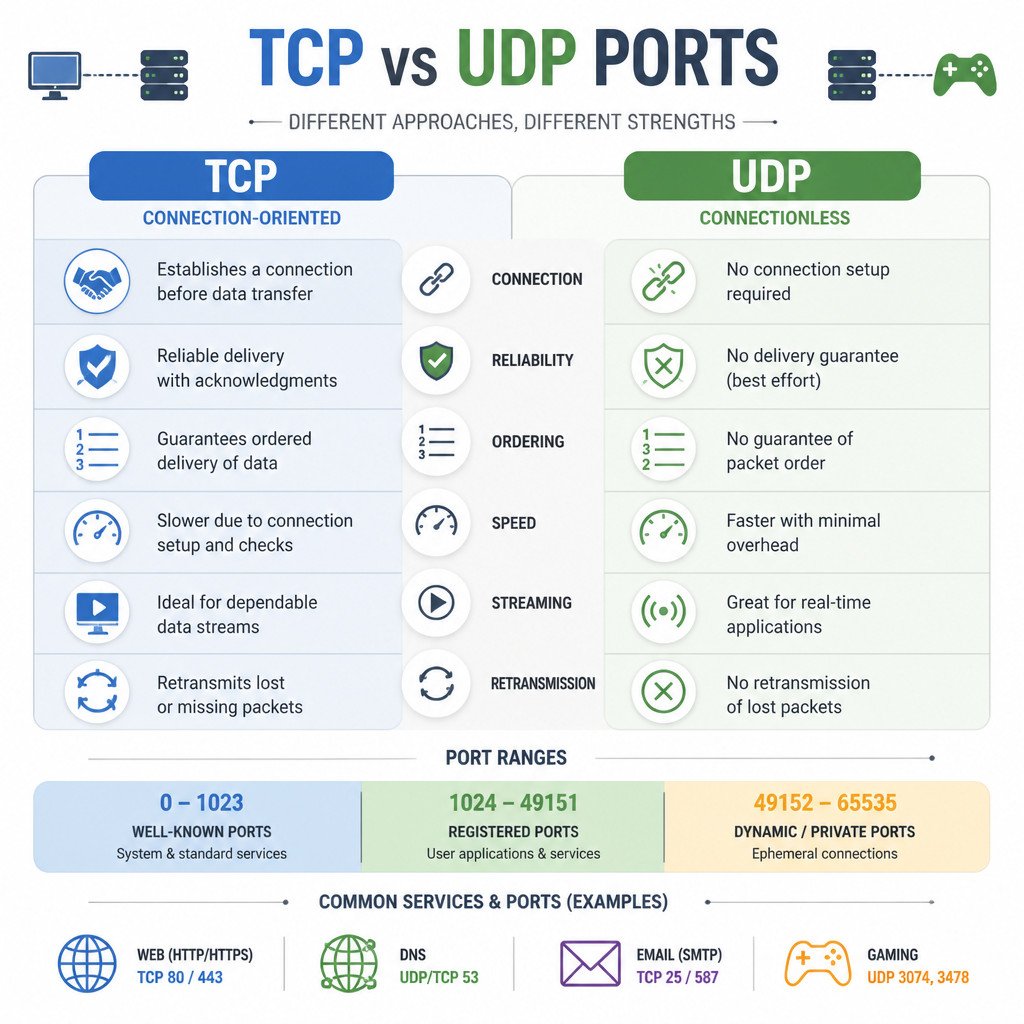
TCP and UDP ports identify application services on a device, but these transport protocols move data in different ways. TCP establishes a connection, then provides reliable delivery in the correct order. UDP sends separate datagrams without creating a connection first. That reduces overhead, though delivery and ordering aren’t guaranteed.
A port number by itself is incomplete. TCP port 53 and UDP port 53 are separate endpoints, even though both are commonly linked to DNS. Whenever you configure a firewall, router, cloud security rule, or application, you need to specify the transport protocol as well as the port number.
TCP and UDP ports at a glance
- TCP: Connection-oriented and reliable, with ordered delivery and retransmission of missing data.
- UDP: Connectionless and lightweight, making it useful for applications that favor low latency or handle reliability themselves.
- Port range: Both protocols use unsigned 16-bit port numbers ranging from 0 through 65535.
- Separate namespaces: A device can use TCP port 5000 and UDP port 5000 at the same time.
- Security: A firewall should expose only the ports an application actually requires.
What is a network port?
A network port is a logical number that TCP or UDP uses to direct traffic to the right application or service. It isn’t a physical connector like an Ethernet port or USB port.
The IP address identifies a network interface, while the port helps identify a service available through that interface. For example, a web server may listen on TCP port 443 while an SSH server on the same IP address listens on TCP port 22.
Each network conversation is distinguished by its transport protocol, source IP address, source port, destination IP address, and destination port. Using this combination, a computer can maintain many simultaneous connections to one server.
How TCP ports work
TCP starts communication with a connection setup process commonly known as the three-way handshake. It numbers the transmitted data, confirms that data has arrived, retransmits anything that’s missing, and gives the receiving application an ordered byte stream.
Those properties make TCP a good fit when missing or reordered data would damage the result. Typical examples include loading a traditional web page, transferring a file, connecting through SSH, and submitting email.
Advantages of TCP
- Confirms delivery and retransmits missing segments.
- Provides application data in the correct order.
- Includes flow control and congestion control.
- Gives applications a continuous byte stream.
TCP limitations
- Setting up the connection adds latency.
- Acknowledgments and connection state add overhead.
- Waiting for retransmissions may be undesirable during real-time communication.
How UDP ports work
UDP sends self-contained datagrams without creating a transport-layer connection beforehand. It doesn’t confirm delivery, put datagrams back into transmission order, or automatically retransmit those that are lost.
That doesn’t mean an application using UDP has to be unreliable. Applications can add acknowledgments, retransmission, encryption, and congestion control when those features are needed. QUIC, the transport technology behind HTTP/3, runs over UDP while providing reliability and security above the UDP layer.
Advantages of UDP
- No connection handshake at the UDP layer.
- A small protocol header and low processing overhead.
- Support for broadcast and multicast where the network allows them.
- A good fit when current data is more useful than data that arrives late.
UDP limitations
- No built-in delivery confirmation or retransmission.
- No built-in ordering for datagrams.
- The application must deal with loss or duplication if either one matters.
TCP and UDP port number ranges
TCP and UDP each support port numbers from 0 to 65535. The Internet Assigned Numbers Authority separates these numbers into three broad ranges:
- Well-known ports, 0–1023: These are commonly assigned to widely used system services. On Unix-like systems, binding to a port below 1024 normally requires elevated privileges or a specific capability.
- Registered ports, 1024–49151: These ports are assigned or registered for applications and products. Registration doesn’t guarantee that a port will be unused on every system.
- Dynamic or private ports, 49152–65535: This range is intended for temporary or private use. Operating systems often choose source ports from an ephemeral range, and that range may differ from the formal one.
Port 0 is reserved and isn’t normally used as a destination service port. In software development, requesting local port 0 often tells the operating system to choose an available ephemeral port automatically.
Common TCP and UDP port examples
The assignments below are common defaults. They don’t prove that a particular service is running, and administrators can move many services to other ports.
- TCP 22: SSH remote login and secure file transfer.
- TCP 25: SMTP server-to-server email transfer.
- TCP and UDP 53: DNS. Ordinary queries often use UDP. TCP is used when required, including for zone transfers and responses that need TCP handling.
- UDP 67 and 68: DHCP communication between IPv4 servers and clients.
- TCP 80: HTTP web traffic.
- UDP 123: Network Time Protocol.
- TCP 143: IMAP email access without implicit TLS.
- TCP 443: HTTPS using HTTP/1.1 or HTTP/2.
- UDP 443: Commonly used by QUIC and HTTP/3.
- TCP 587: Email message submission, commonly with STARTTLS.
- TCP 993: IMAP over implicit TLS.
Can TCP and UDP use the same port?
Yes. TCP and UDP have independent port spaces. One application can listen on TCP port 53 while another socket listens on UDP port 53 using the same IP address. DNS servers often listen on both because clients may need either transport protocol.
Firewall rules distinguish between TCP and UDP too. Allowing inbound TCP traffic on port 53 doesn’t automatically permit UDP traffic on port 53. If the service needs both, create a rule for each protocol or choose a rule type that explicitly includes both.
How to choose between TCP and UDP
Application developers should choose TCP when every byte needs to arrive correctly and in sequence, unless a higher-level protocol supplies those guarantees. It’s the usual choice for file transfers, database sessions, remote administration, and protocols designed around a reliable stream.
UDP makes sense when low latency, independent messages, multicast, or application-controlled reliability is needed. Common examples include DNS queries, time synchronization, voice calls, live media, online games, and modern transports such as QUIC.
If you’re configuring existing software, don’t choose the protocol arbitrarily. Check the application’s documentation, then open the exact destination port and protocol it specifies.
Port configuration best practices
- Expose only required ports. Every open port increases the attack surface that’s accessible over the network.
- Specify the protocol. Check whether the application needs TCP, UDP, or both.
- Restrict source addresses. Where practical, limit administrative services such as SSH to trusted networks.
- Don’t rely on port changes for security. Moving a service may reduce routine scanning noise, but it can’t replace authentication, encryption, or patching.
- Document custom assignments. Keep a record of nonstandard ports to avoid conflicts and make troubleshooting easier.
- Verify the listening service. A firewall rule doesn’t start an application. The service must be running and bound to the expected interface as well.
Frequently asked questions
Is TCP always better than UDP?
No. TCP is the better choice when an application needs built-in, reliable delivery in the correct order. UDP may be more suitable for low-latency traffic, multicast, simple request-response protocols, or applications that provide their own transport behavior.
Are TCP ports more secure than UDP ports?
Neither transport protocol is inherently secure. Security depends on the application protocol, encryption, authentication, implementation, firewall policy, and system configuration. TCP’s connection handling doesn’t make application data private by itself.
Why does DNS use both TCP and UDP port 53?
UDP works efficiently for many DNS queries and responses. DNS also supports TCP when necessary, including zone transfers and cases where a client retries or communicates over TCP. Secure DNS variants may use different ports and transports.
Does an open port mean a firewall is disabled?
No. A firewall can allow selected ports while blocking everything else. A port is reachable only if a service is listening, the firewall permits the traffic, and the network path routes the packets correctly.
Can two applications use the same port?
In general, two applications can’t bind the same protocol, IP address, and port combination at the same time unless both the operating system and the applications support special socket-sharing behavior. They can use the same port number on different IP addresses or with different transport protocols.
