
An SBOM, or software bill of materials, is a formal inventory of the software components in an application, including their versions and relationships. When a serious vulnerability is announced, it helps answer a pressing practical question: do we use the affected component, and if so, in which product or deployment?
Think of it as an ingredient list for software, with an important difference: a useful SBOM is structured for tools as well as people. It can be correlated with vulnerability advisories and other risk information. The US Cybersecurity and Infrastructure Security Agency (CISA) describes an SBOM as a nested inventory of software components in machine-processable form.
An SBOM is valuable because modern software rarely consists only of code written by one vendor. It often includes direct dependencies, indirect dependencies brought in by those dependencies, operating-system packages, and reusable libraries. Without a dependable inventory, teams may have to ask each supplier or manually inspect systems after every high-profile security alert.
What an SBOM can and cannot tell you
An SBOM can show that a named component and version appear in a particular software release. That makes it a strong starting point for triage. It does not automatically show that the vulnerable code is reachable, enabled, exposed to an attacker, or running in a specific environment. Those are separate questions for the vendor, security team, and system owner.
It also is not a security score. An inventory may be stale or incomplete, and a clean search result can reflect a naming mismatch rather than the absence of a component. Treat the document as evidence to investigate, not as proof that there is no risk.
- An SBOM helps with: locating components, identifying affected product releases, prioritizing follow-up, and documenting dependency information.
- An SBOM does not replace: security advisories, patches, configuration review, exposure analysis, backups, monitoring, or vendor support.
The foundational NTIA description similarly frames an SBOM as a formal record of component details and supply-chain relationships. The specific fields and operational practices continue to evolve, so it is more useful to evaluate whether an SBOM answers the incident at hand than to treat one older checklist as a universal pass-or-fail test.
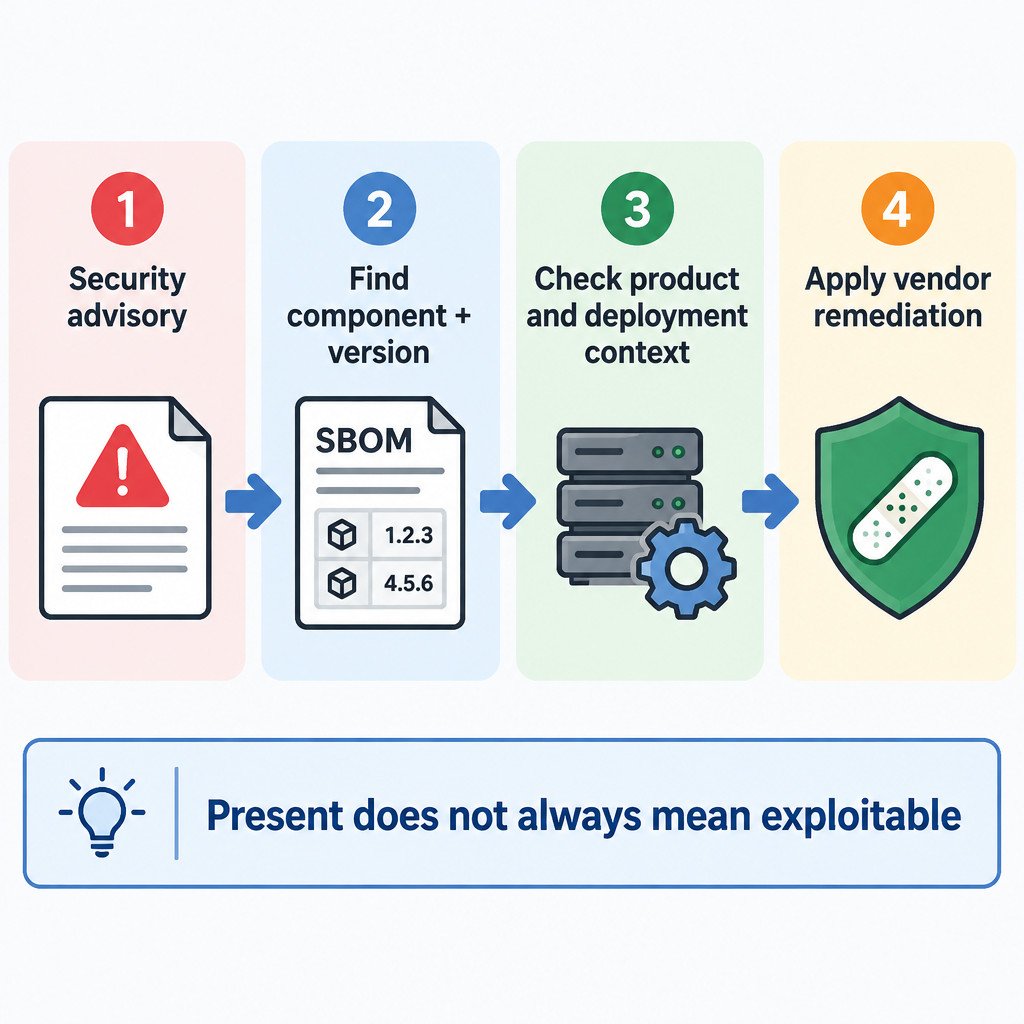
How to use an SBOM after a vulnerability announcement
Start with the advisory, not just the component name in a news headline. Record the affected versions, the conditions described by the advisory, and the remediation offered. Then obtain the SBOM that covers the exact product release you own or deploy.
Consider this illustrative scenario. An advisory identifies versions 4.2 through 4.4 of the fictional library Northstar Parse. A company uses a vendor application called LedgerDesk 8.1. The team obtains the SBOM specifically for LedgerDesk 8.1 and searches for the library name and version. If it lists Northstar Parse 4.3, the result establishes a reason to investigate LedgerDesk 8.1. It does not establish that every LedgerDesk installation can be exploited.
- Confirm the affected component identifiers and version range from the security advisory.
- Match the SBOM to the exact product, edition, release, and, where relevant, deployment image.
- Search for the component and version. Check alternate names or package identifiers if the first search fails.
- Review dependency relationships to understand whether the component is direct or transitive.
- Check the vendor’s advisory and remediation instructions for that product release.
- Determine operational context: is the affected feature installed, enabled, internet-reachable, or handling untrusted input?
- Apply the vendor’s supported update or mitigation, then record the decision and verify the deployed version.
The most useful output of this process may be a clear status statement: not present; present but outside the affected range; present and awaiting vendor guidance; or remediated. Avoid reducing the result to “safe” unless the relevant technical and operational questions have actually been resolved.
What to look for in a useful SBOM
At minimum, an inventory should let you identify each component unambiguously enough to compare it with an advisory. In practice, that means component names, versions, suppliers or authors where available, and metadata about the SBOM itself. Dependency relationships matter because a library may arrive several layers below the application you recognize.
| Information | Why it matters during triage |
|---|---|
| Product and release covered | Prevents applying one release’s inventory to another. |
| Component identity and version | Supports comparison with an advisory’s affected range. |
| Supplier or component source | Helps distinguish similarly named packages. |
| Dependency relationships | Shows how a transitive component entered the product. |
| Creation date and generation details | Provides context for possible staleness and coverage limits. |
| Machine-readable format | Makes repeated searches and correlation more reliable than manual reading. |
You may receive an SBOM in SPDX or CycloneDX format rather than as a spreadsheet or a polished report. SPDX is an open standard for representing this kind of information, with published specifications including version 3.0. For most buyers and administrators, the important task is not editing these files by hand; it is retaining the file with the release it covers and knowing who can use it during an incident.
Why timing and scope matter
Not every inventory describes the same point in the software lifecycle. A source SBOM may describe declared dependencies in source code. A build SBOM may describe what was included in a release artifact. An analyzed SBOM may be created by inspecting an artifact after the fact. A deployed inventory aims to describe what is actually installed or running in an environment.
These can differ. A build-time SBOM for version 8.1 may be accurate for its installation package but fail to show that a customer has not yet installed the update, has disabled the affected module, or has added a separate plug-in. Ask what the document covers before relying on it for an operational decision.
Questions to ask a software vendor
- Which exact product, edition, version, and build does this SBOM cover?
- When was it generated, and does it describe source, build output, an analyzed artifact, or a deployment?
- Are component versions and dependency relationships included?
- Which machine-readable format is provided?
- How will the vendor communicate vulnerability findings, mitigations, and fixed releases?
- Is a new SBOM available with each supported release or material update?
An SBOM makes vulnerability response more repeatable by improving component visibility. It is most effective when paired with a defined owner for advisories, an update process, records of deployed versions, and a way to reach the vendor when the inventory leaves unanswered questions.
