Start by preserving the exact error message, timestamp, host, port, database name, and client IP address. Redact passwords, tokens, and complete production connection strings before sharing them. PostgreSQL connection problems become much easier to solve when you identify the failed layer before changing configuration.
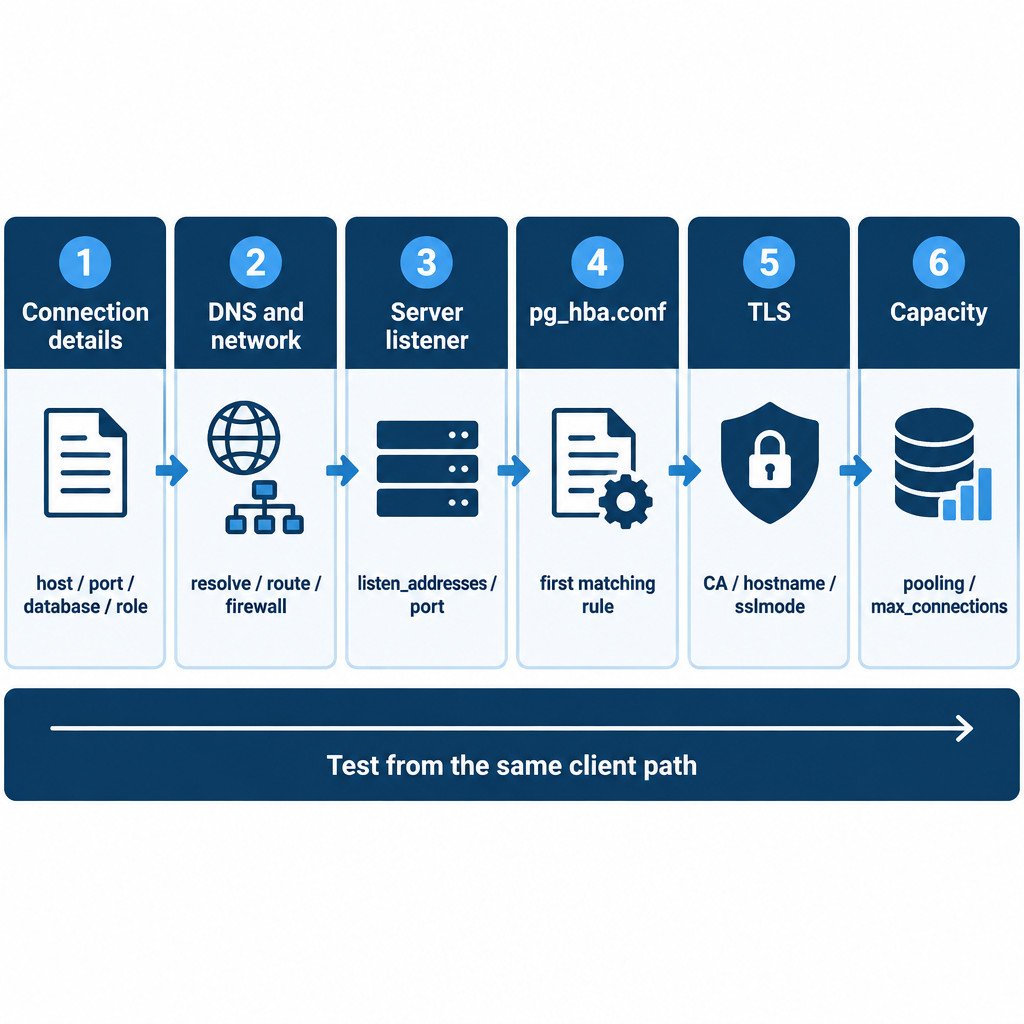
The usual path is: application or client → DNS and network → PostgreSQL listener → pg_hba.conf authentication rule → TLS negotiation → database role and available connection slot. An error at an earlier layer makes later-layer changes irrelevant. For example, editing pg_hba.conf cannot fix a hostname that does not resolve or a server that is not listening on the expected interface.
Classify the error before changing anything
| Typical symptom | Likely failed layer | First check |
|---|---|---|
| Hostname cannot be resolved | DNS or connection details | Confirm the hostname used by the application and test name resolution from the same client network. |
| Connection timed out | Network path, firewall, routing, or wrong address | Confirm the target IP and port, then review approved network controls. |
| Connection refused | Server listener, port, or local firewall | Confirm PostgreSQL is running and listening where expected. |
| No pg_hba.conf entry or password authentication failed | Client authentication | Check the role, source address, rule order, and authentication method. |
| Certificate or TLS error | TLS configuration or hostname validation | Check the CA, certificate name, and client sslmode. |
| Too many clients already | Connection capacity | Review pooling, leaks, and active connections before increasing limits. |
1. Verify the intended target
Check the host, port, database, and role as separate values. Do not assume that a successful connection from one machine proves that another machine uses the same target or route. PostgreSQL commonly uses port 5432, but the server can be configured to use another port. Connection parameters such as host, port, database, user, timeout, and TLS mode are controlled by the client connection settings. PostgreSQL libpq connection documentation
For an authorized, temporary test, use separate parameters rather than placing a password in a shell command:
psql "host=db.example.internal port=5432 dbname=appdb user=app_user sslmode=verify-full"Enter the password only when prompted, or use your organization’s approved secret mechanism. If you use a URI instead, reserved characters in URI components must be percent-encoded. A password containing @, for instance, can change how the URI is parsed if it is not encoded. Never paste a real production URI into a ticket, screenshot, or shared terminal history.
2. Test whether the server is reachable
From the same network path as the affected application, run a readiness check with the expected host and port:
pg_isready -h db.example.internal -p 5432 -d appdbThis is a quick way to distinguish an unavailable server or unreachable endpoint from a likely credential or SQL-permission issue. It is not proof that the application can authenticate, negotiate TLS with its own settings, or run its queries. A managed service, container platform, VPN, load balancer, or corporate firewall can add further layers outside PostgreSQL itself.
3. Investigate timeouts and connection refusals
A timeout generally means the client did not receive a usable response. Check DNS results, routing, VPN state, load balancer settings, and firewall or security rules that apply to the approved client network. A refusal often means an address was reached but nothing accepted the connection on that port, although intervening devices can alter symptoms.
On the server side, confirm that PostgreSQL is running, then verify its actual listening address and port. The listen_addresses setting controls the TCP/IP addresses on which PostgreSQL accepts connections, while port selects the listening port. The listener setting commonly defaults to local loopback addresses; changes to listen_addresses or port require a server restart. PostgreSQL connection and authentication settings
Do not respond to an outage by exposing the database to every network. Instead, identify the required client network, confirm the intended address and port, and permit only that path through the relevant host firewall, cloud security control, or network policy. The exact steps depend on your operating system and deployment platform.
4. Resolve authentication failures in pg_hba.conf
If PostgreSQL is reached but denies access, read the error literally. Common causes include no matching pg_hba.conf entry, an incorrect password, an authentication method that does not match the client, a nonexistent role, or a nonexistent database.
pg_hba.conf is the host-based client authentication file. Its records are evaluated in order: the first matching record is used, and PostgreSQL does not fall through to a later record if authentication under that rule fails. Put narrowly scoped approved rules before broader ones, and use the smallest appropriate CIDR range. PostgreSQL pg_hba.conf documentation
- Confirm the client source IP, not just the address you expect it to have.
- Match the intended database and role.
- Use a narrow approved network range rather than an all-address range.
- Choose an authentication method supported by your client and security policy.
- Do not add a broad
trustrule as a quick fix. It can allow password-free access from networks you did not intend to authorize.
After an authorized edit, reload or restart PostgreSQL as required by the deployment and configuration change. If you already have a working privileged connection, the pg_hba_file_rules view can reveal rule order and parsing errors. It shows the current file contents and is normally restricted to superusers, so it is a diagnostic aid rather than a workaround for lost administrative access. PostgreSQL pg_hba_file_rules reference
5. Keep TLS troubleshooting separate from password troubleshooting
A correct password cannot fix a certificate mismatch, and a valid certificate cannot fix an incorrect password. Check the client’s TLS setting independently. In libpq-based clients, sslmode controls how TLS is requested and verified. Where the environment provides a trusted CA and hostname validation is required, verify-full validates both the certificate chain and the server hostname.
Do not permanently switch to sslmode=disable or accept an invalid certificate simply to make a test pass. That only removes a security control and hides whether the CA bundle, certificate name, endpoint hostname, or proxy configuration is wrong. Compare the application hostname with the name covered by the certificate, and obtain the correct CA material through the approved deployment process.
6. Check capacity after the server accepts connections
An error such as “too many clients already” points to connection capacity, not DNS or password configuration. PostgreSQL limits concurrent connections with max_connections. Raising that setting uses additional resources, so first inspect whether the application is opening connections without returning them, whether a connection pool is sized appropriately, and whether idle sessions are expected.
Illustrative example: an application has 8 worker processes, each pool permits 15 database connections, and one administration tool can use 5 connections. Its potential demand is (8 × 15) + 5 = 125 connections before accounting for other services. This does not mean the server should be set to 125 connections; it shows why pool limits across all clients must be considered together.
Capacity changes should account for the server’s memory, workload, reserved administrative access, and every application that shares the instance. PostgreSQL documents that increasing max_connections increases resource allocation, so treating pooling and leaks first is often the safer operational decision. PostgreSQL connection resource settings
7. Confirm the fix from the real client path
Retest from the same network, host, and client settings used by the failing application. A successful connection from a database server’s local shell does not prove that a remote workstation, container, or production application can connect. In psql, run \conninfo after connecting to confirm the actual host, database, user, and SSL details in use.
A safe escalation bundle
When the issue needs to be handed to a database, network, or platform administrator, provide evidence that identifies the layer without disclosing secrets:
- Exact error text and timestamp, with passwords and tokens removed
- Redacted host, port, database, role, and TLS mode
- Client IP address or source network, plus whether a VPN or proxy is involved
- PostgreSQL version and relevant server logs around the timestamp
- The
pg_isreadyresult from the affected path - Whether the problem affects one client, one network, or every client
- Any recent changes to DNS, firewall rules, certificates, listener settings, authentication rules, or connection pools
The disciplined order is simple: validate the destination, test reachability, verify the listener, evaluate the first matching authentication rule, validate TLS, then investigate capacity. It reduces unnecessary changes and avoids weakening access controls while diagnosing the wrong layer.