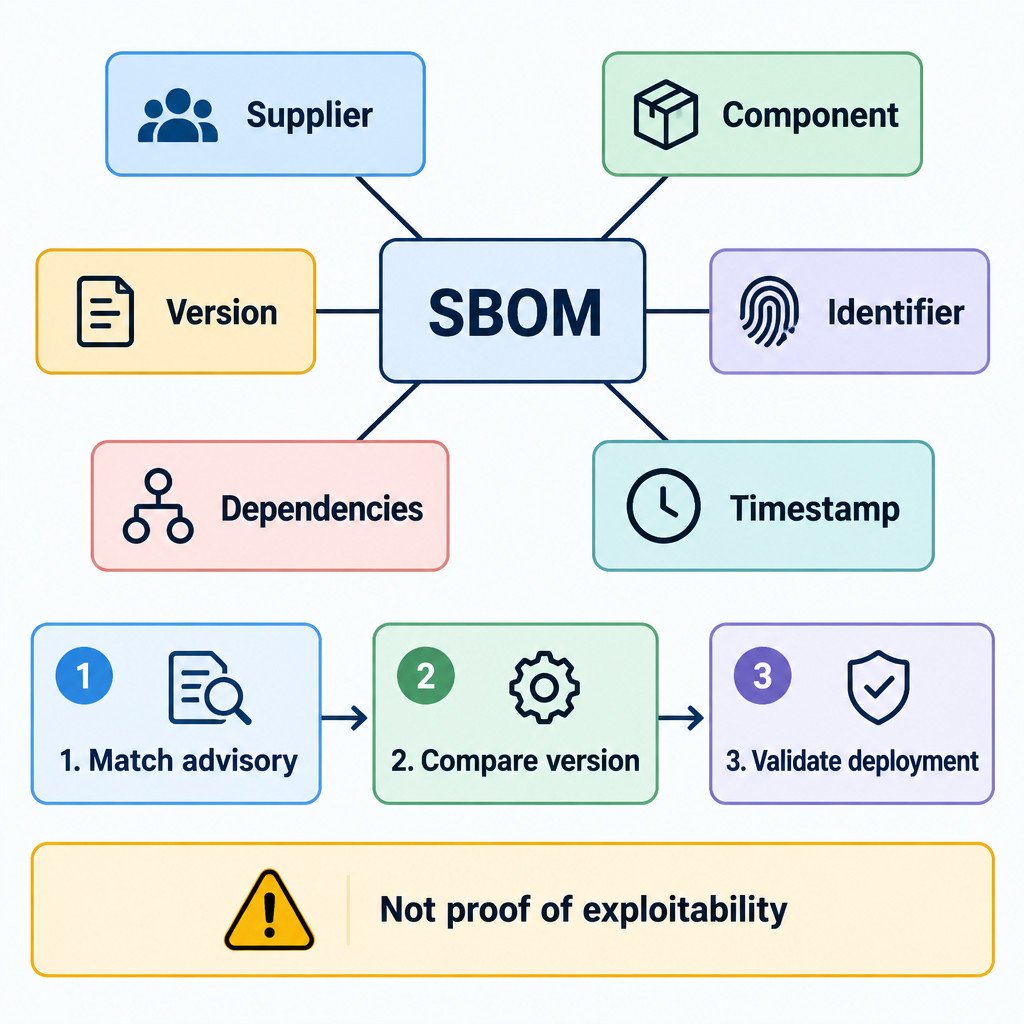
An SBOM, or software bill of materials, is a structured, machine-readable inventory of the software components that make up a particular product release. It records details such as component names, versions, suppliers, identifiers, and relationships between dependencies. In practical terms, it gives an organization a starting point for answering: “Could this software contain the component affected by this security issue?”
Think of it as an ingredient label for software. If an ingredient is recalled, the label can help identify products that may need attention. It does not prove that every product containing the ingredient is unsafe, and it does not prescribe the remedy. Likewise, an SBOM is not a vulnerability report, a patch plan, or a security guarantee.
Its value is speed and traceability. Modern applications commonly combine first-party code, open-source libraries, commercial components, and dependencies pulled in by other dependencies. When a component vulnerability is disclosed, a version-specific inventory can reduce the time spent guessing what may be installed.
Why the exact software version matters
An SBOM should be tied to a specific released version and delivery artifact, such as a desktop installer, container image, or cloud service release. A list for version 4.1 may not describe version 4.2 after a library upgrade, removal, or build change. CISA’s minimum-elements guidance emphasizes version-specific identification, component coverage, known unknowns, and keeping SBOM information updated as software changes.
That distinction also explains why two SBOMs for what appears to be the same application can differ. One may describe source code, another the final build, and another what was observed in a deployed environment. These are different views with different strengths and gaps.
What a useful SBOM contains
The precise fields vary by format and producer, but a useful SBOM lets a recipient identify both the software being described and the components within it. At a minimum, look for clear answers to the following questions.
| Information | Why it matters |
|---|---|
| Product and release identity | Connects the document to the exact software, build, image, or package received. |
| Component supplier and name | Distinguishes similarly named packages and identifies who supplied a component. |
| Component version | Lets a team compare the listed version with the versions named in an advisory. |
| Unique identifier | Provides a less ambiguous way to refer to a component than a display name alone. |
| Dependency relationship | Shows whether a component is directly included or arrives through another dependency. |
| Author and timestamp | Provides basic provenance and helps readers judge whether the information may be stale. |
| Known unknowns | Makes gaps visible instead of implying the inventory is complete. |
Dependency relationships matter because a direct dependency can bring in many transitive dependencies. For example, an application may use Library A directly, while Library A includes Library B. If an advisory concerns Library B, a component list that omits transitive dependencies may not be enough for reliable triage.
How an SBOM supports vulnerability triage
An SBOM can narrow an investigation, not finish it. A sensible sequence is to identify the affected component and version range in an advisory, compare it with the relevant SBOM, then validate the result against the actual product, configuration, and deployment. The final validation is important: a listed component may not be reachable or used in the vulnerable way, while an incomplete SBOM may fail to list a component that is present.
- Match the advisory to the exact product release and delivery method in use.
- Search the SBOM by component name and, where available, its unique identifier.
- Compare the listed version with the affected and fixed version ranges in the advisory.
- Confirm whether the component is included in the deployed artifact and whether the relevant feature or code path is used.
- Record the decision, then apply the vendor’s remediation or compensating controls when appropriate.
Illustrative example: An advisory affects WidgetParser versions earlier than 2.4. A product SBOM lists WidgetParser 2.3. That is a reason to investigate, not proof of exploitation or even exploitability. The team still needs to confirm that the package is in the deployed build, that the vulnerable function is relevant, and what update the product vendor recommends.
Why SBOMs from different stages can tell different stories
SBOMs may be created from design information, source code, a build process, an analysis of an artifact, a deployed system, or runtime observation. CISA’s SBOM document taxonomy describes these lifecycle views and their tradeoffs. A source-oriented document can reveal planned dependencies but may not reflect the final package; a runtime-oriented view can reveal observed components but may miss code that was not exercised.
When requesting an SBOM, ask what it represents and how it was produced. “Do you have an SBOM?” is less useful than “Do you have an SBOM for this released container image, and does it cover transitive dependencies?”
Formats: focus on compatibility, not labels
SPDX and CycloneDX are two common ways to express machine-readable software component information. SPDX is an open specification for communicating bill-of-material information, while CycloneDX can represent components, services, dependencies, and their relationships. For a buyer or operations team, the practical question is whether the format can be stored, read, and ingested by the vulnerability or asset-management processes already in place.
A PDF can be helpful for human review, but it is usually less useful for repeated comparison and automation than a structured file. Request the machine-readable original when possible, while also ensuring the receiving team can work with the provided format.
What an SBOM cannot tell you
- It cannot guarantee that the software has no vulnerabilities.
- It cannot establish that a listed vulnerability is exploitable in a particular deployment.
- It cannot make an incomplete, stale, or incorrect inventory reliable.
- It cannot prove a component is absent unless the SBOM’s coverage and production method make that conclusion credible.
- It cannot replace vendor advisories, patch testing, configuration review, or incident-response decisions.
These limitations are not a reason to ignore SBOMs. They are a reason to treat them as evidence with defined scope. Confidence should be higher when the document identifies its artifact and generation date, covers the relevant dependency layers, discloses gaps, and is refreshed with releases.
A practical vendor request checklist
- Request an SBOM for the exact released version, build, container image, installer, or service release being purchased or operated.
- Ask which delivery methods it covers. An on-premises installer and a hosted service may have different component inventories.
- Ask whether direct and transitive dependencies are included.
- Ask how the SBOM was produced and whether it represents source, build, artifact, deployment, or runtime information.
- Ask how unknown, proprietary, redacted, or otherwise unverified components are disclosed.
- Ask how often the vendor refreshes the SBOM and how recipients receive corrections.
- Identify a contact or process for questions when an advisory affects a listed component.
Put the file to work
Store each SBOM alongside the corresponding software version and its acquisition or deployment record. During a component advisory, use it to prioritize the right owners and products for validation. Where established vulnerability or asset-management tools are available, import the structured file only after confirming that the product identifier, version, and format map sensibly to your records.
The useful habit is simple: keep the inventory with the release, understand its scope, and refresh it when the software changes. That turns an SBOM from a procurement attachment into a practical input for security and operational decisions.