PostgreSQL Row-Level Security (RLS) is a useful second boundary for multi-tenant data: it makes the database evaluate which rows a role may read or change. An application query should still include a tenant filter for correctness and efficiency, but a WHERE clause in application code is not the security boundary. A missed filter, a faulty join, or a future code path can otherwise expose another tenant’s data.
RLS restricts rows returned by SELECT and rows affected by INSERT, UPDATE, and DELETE according to policies. Once RLS is enabled, normal roles need an applicable policy as well as ordinary table privileges; without a policy, access is default-deny. PostgreSQL documents the important exceptions for table owners, superusers, and roles with BYPASSRLS in its Row Security Policies documentation.
Scope and example assumptions
This is a deliberately small, illustrative design for PostgreSQL 12 or later: one login role represents one tenant, and a database administrator owns the table. The tenant names, invoice IDs, and amounts below are invented examples. A production service may instead map authenticated users or identity claims to an application role, especially when it uses connection pooling.
Create the table as an administrative owner, not as either tenant role. The tenant_name column is the value RLS will use to separate rows.
CREATE TABLE public.invoices (
    invoice_id  bigint GENERATED ALWAYS AS IDENTITY PRIMARY KEY,
    tenant_name text NOT NULL,
    amount      numeric(12,2) NOT NULL CHECK (amount >= 0)
);

INSERT INTO public.invoices (tenant_name, amount) VALUES
    ('tenant_alpha', 125.00),
    ('tenant_alpha', 80.50),
    ('tenant_beta',  240.00);
Do not treat the tenant_name value supplied by a client as trustworthy on its own. The write policies below validate the proposed value before PostgreSQL accepts an insert or update.
Create restricted tenant roles and grants
Run role creation as a suitably authorized administrator. The LOGIN attribute permits a role to connect, while NOSUPERUSER and NOBYPASSRLS ensure these accounts cannot bypass ordinary RLS checks. Authentication setup and password or certificate handling are intentionally outside this example.
CREATE ROLE tenant_alpha LOGIN NOSUPERUSER NOBYPASSRLS NOINHERIT;
CREATE ROLE tenant_beta  LOGIN NOSUPERUSER NOBYPASSRLS NOINHERIT;

-- Replace billing with the actual database name.
GRANT CONNECT ON DATABASE billing TO tenant_alpha, tenant_beta;
GRANT USAGE ON SCHEMA public TO tenant_alpha, tenant_beta;
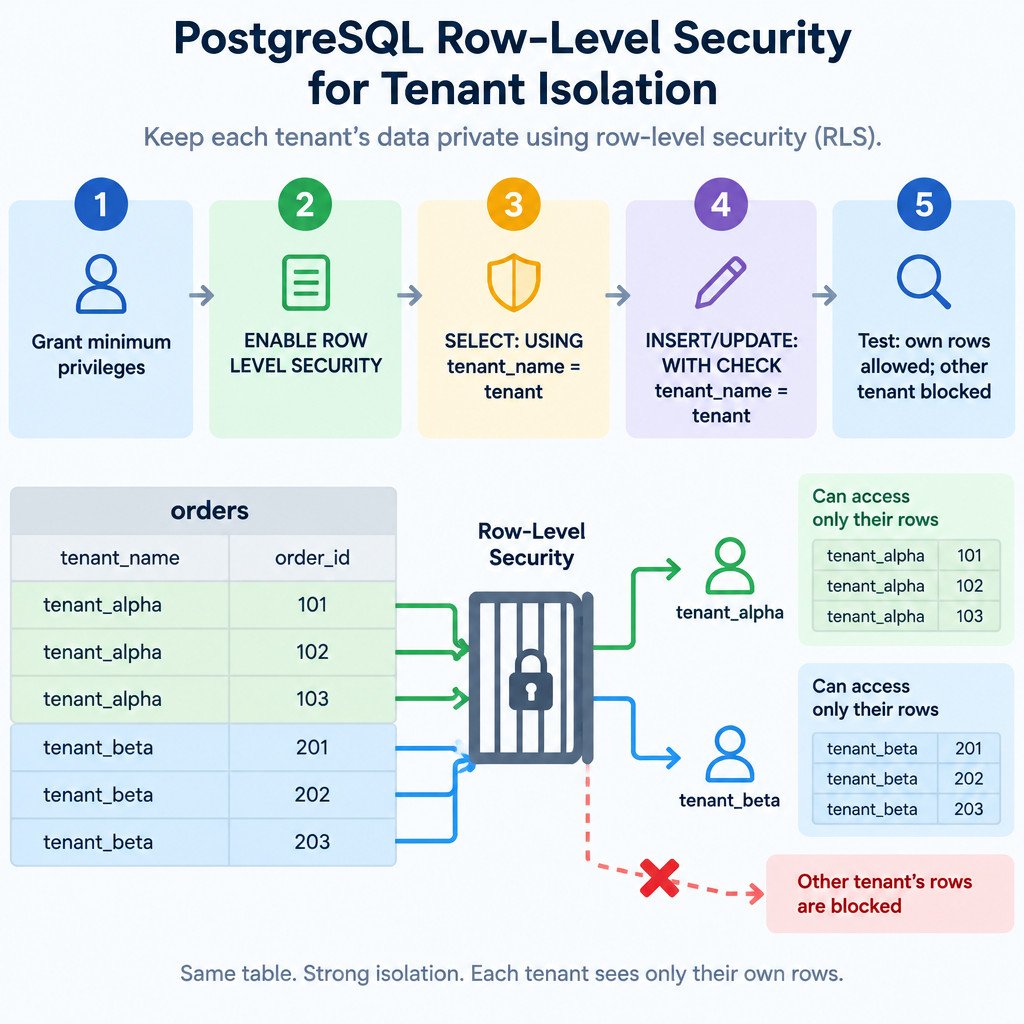
GRANT SELECT, INSERT, UPDATE ON public.invoices TO tenant_alpha, tenant_beta;
GRANT USAGE, SELECT ON SEQUENCE public.invoices_invoice_id_seq
    TO tenant_alpha, tenant_beta;
The sequence grant is needed because invoice_id is generated from an identity sequence. DELETE is intentionally not granted here; add it only if the application needs it, together with a matching DELETE policy. PostgreSQL role attributes, including LOGIN, SUPERUSER, and BYPASSRLS, are defined in the CREATE ROLE reference.
Enable RLS, then add read and write policies
Enable RLS before relying on any policy. Policies can exist while RLS is disabled, but they are not enforced in that state.
ALTER TABLE public.invoices ENABLE ROW LEVEL SECURITY;Create separate policies for visibility, inserts, and updates. In a policy, USING is evaluated against existing rows: it decides which rows are visible or eligible for an operation. WITH CHECK is evaluated against a proposed new row: it prevents a tenant from inserting or changing a row to claim another tenant.
CREATE POLICY tenant_alpha_read ON public.invoices
    FOR SELECT TO tenant_alpha
    USING (tenant_name = 'tenant_alpha');

CREATE POLICY tenant_alpha_insert ON public.invoices
    FOR INSERT TO tenant_alpha
    WITH CHECK (tenant_name = 'tenant_alpha');

CREATE POLICY tenant_alpha_update ON public.invoices
    FOR UPDATE TO tenant_alpha
    USING (tenant_name = 'tenant_alpha')
    WITH CHECK (tenant_name = 'tenant_alpha');

CREATE POLICY tenant_beta_read ON public.invoices
    FOR SELECT TO tenant_beta
    USING (tenant_name = 'tenant_beta');

CREATE POLICY tenant_beta_insert ON public.invoices
    FOR INSERT TO tenant_beta
    WITH CHECK (tenant_name = 'tenant_beta');

CREATE POLICY tenant_beta_update ON public.invoices
    FOR UPDATE TO tenant_beta
    USING (tenant_name = 'tenant_beta')
    WITH CHECK (tenant_name = 'tenant_beta');
The distinction matters. An UPDATE policy with only USING would limit which existing rows tenant_alpha can target, but it would not explicitly prevent a permitted row from being changed to tenant_beta. The CREATE POLICY syntax and these two expressions are described in the PostgreSQL CREATE POLICY documentation.
Test with the roles that the application will use
Test from separate connections authenticated as tenant_alpha and tenant_beta. Do not use the table owner for these tests. SET ROLE can be useful in controlled administration sessions, but it works only when the session role is permitted to switch, so a direct tenant login is a clearer isolation test.
| Connection role | Test | Expected result |
|---|---|---|
| tenant_alpha | SELECT * FROM public.invoices; | Only tenant_alpha rows appear. |
| tenant_alpha | INSERT a row with tenant_name = ‘tenant_alpha’ | The insert is allowed. |
| tenant_alpha | INSERT a row with tenant_name = ‘tenant_beta’ | PostgreSQL rejects the new row because it fails the RLS check. |
| tenant_alpha | UPDATE an alpha row to tenant_name = ‘tenant_beta’ | PostgreSQL rejects the changed row because it fails WITH CHECK. |
| tenant_alpha | UPDATE a beta row | Normally affects zero rows because the beta row is not visible to this role. |
A zero-row UPDATE is different from a permission error, so test both the returned row count and the final data state. Repeat the same cases as tenant_beta. These deny-case tests are the evidence that the policy is enforcing isolation rather than merely allowing expected reads.
Owner and bypass behavior can invalidate a test
Table owners normally bypass RLS. You can make an owner subject to policies with FORCE ROW LEVEL SECURITY, but this does not make superusers or BYPASSRLS roles subject to RLS. Use FORCE only after considering operational tasks that are intentionally performed by the owner.
ALTER TABLE public.invoices FORCE ROW LEVEL SECURITY;The ALTER TABLE documentation covers ENABLE and FORCE ROW LEVEL SECURITY and the owner behavior. It is a useful reference when reviewing who owns a protected table: PostgreSQL ALTER TABLE reference.
Deploy RLS as a small security change, not a query tweak
- Back up the schema and test the migration in staging first.
- Deploy table grants, RLS enablement, and policies together. A missing grant can break valid access; a missing policy results in default-deny for restricted roles.
- Run allowed and denied tests under the actual application-facing roles, not as the schema owner.
- Document how an authenticated application identity maps to a database role or session context.
- Review every new tenant-bearing table separately. RLS is enabled per table; it does not automatically protect related tables.
- Keep early policies simple. Policies that consult other tables can introduce performance and concurrency considerations that need careful database review.
What RLS does not replace
RLS is one layer of authorization. It does not authenticate users, encrypt connections, protect backups, parameterize SQL, provide audit logs, or restrict network access. Those controls remain necessary. It also cannot compensate for an application connection that uses a superuser, a BYPASSRLS role, or an overly broad table owner.
For a small multi-tenant table, the pattern is straightforward: give each tenant role only the table permissions it needs, enable RLS, use USING for existing-row visibility, use WITH CHECK for new-row ownership, and test cross-tenant failure paths. For a larger production design, have a database administrator review the identity mapping and policy interactions before rollout.
Sources
PostgreSQL documentation: Row Security Policies; CREATE POLICY; ALTER TABLE; CREATE ROLE.