WireGuard or OpenVPN? The quick answer
Start with WireGuard for everyday VPN use, especially on phones and modern computers. Pick OpenVPN if you need to work with an existing VPN deployment, want flexible authentication, or need a TCP connection because the network blocks UDP.
For most people using a commercial VPN app, the sensible order is WireGuard, then OpenVPN UDP, with OpenVPN TCP as a fallback if neither connects. Your app’s automatic mode may already handle that choice.
Neither protocol guarantees anonymity or protects you from phishing. Nor can either make an untrustworthy VPN provider safe. Both can provide strong encrypted tunnels when the software and configuration are sound.
What actually changes when you switch protocols?
A VPN protocol controls how your device establishes an encrypted connection to a VPN server and carries traffic through it. Switching between WireGuard and OpenVPN can affect connection speed, processing overhead, network compatibility, and the authentication methods available to you.
It doesn’t automatically change your provider’s logging practices, server ownership, or privacy policy. Features such as a kill switch and application-based routing usually depend on the VPN client and operating system, rather than the protocol alone.
WireGuard vs OpenVPN in practice
Speed and processing overhead
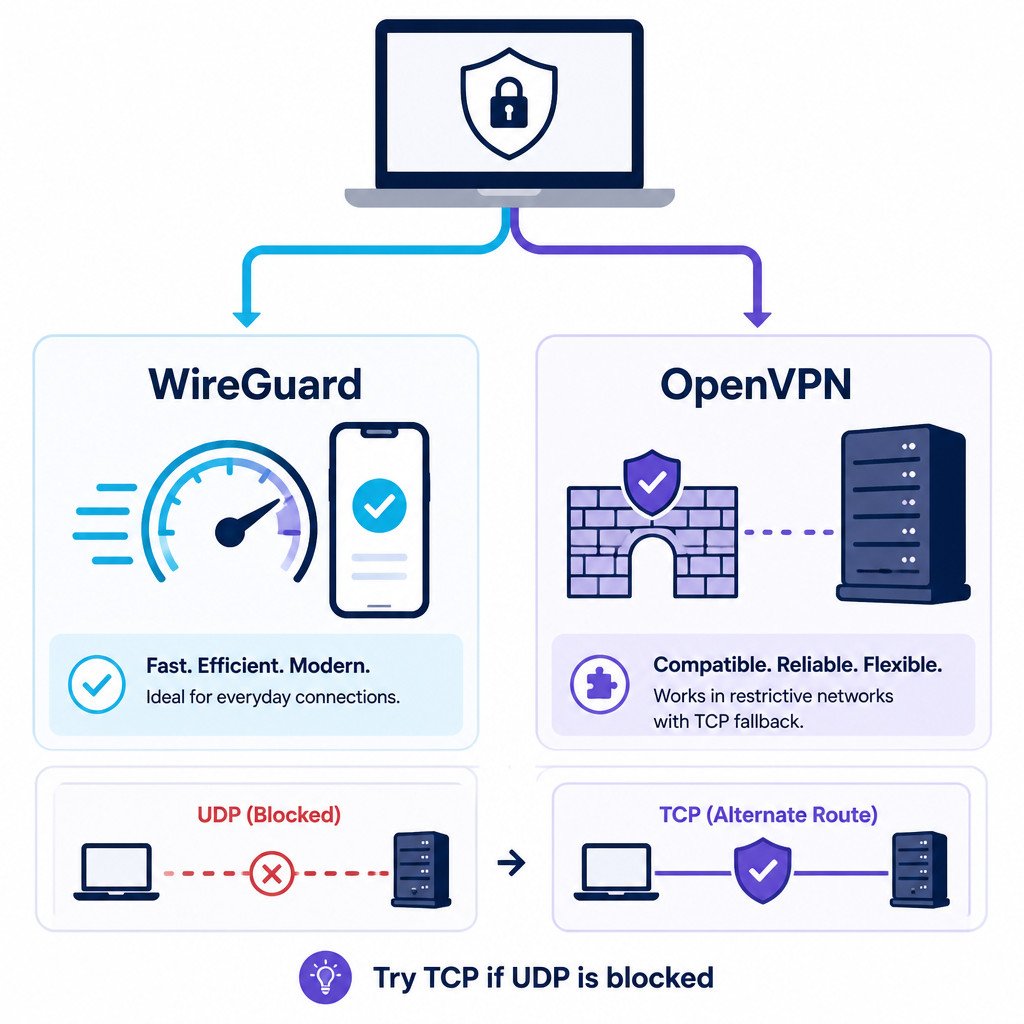
WireGuard combines a compact protocol with a fixed set of modern cryptographic primitives. On many devices, that means high throughput with relatively low CPU usage. It’s a good starting point for fast broadband and mobile connections, as well as home routers that support it.
OpenVPN can be fast too, particularly with suitable hardware and Data Channel Offload. On supported setups, that feature moves data-channel processing into the operating system kernel. Older benchmarks don’t necessarily reflect how OpenVPN performs today.
There’s no universal speed multiplier. Server congestion, distance, device performance, the particular implementation, and your underlying connection can all matter more than the protocol difference.
UDP, TCP, and restrictive networks
WireGuard carries its encrypted packets over UDP. Standard OpenVPN supports UDP or TCP, depending on the server’s configuration.
UDP is usually the better transport for a VPN because it avoids adding another layer of transport-level retransmissions. When OpenVPN TCP carries TCP traffic, the two layers’ retransmission and congestion-control behavior can interfere with each other. That’s especially troublesome on lossy connections.
But OpenVPN TCP has a useful role when a network blocks UDP. A server listening on TCP port 443 may still be reachable when other VPN connections aren’t.
Using TCP port 443 doesn’t make OpenVPN indistinguishable from HTTPS. Network inspection can still identify or block it. Changing WireGuard to UDP port 443 won’t help either if the network blocks all UDP. Follow the network owner’s access rules.
Security and cryptography
WireGuard uses a deliberately limited cryptographic design, including Curve25519 for key agreement and ChaCha20-Poly1305 for authenticated encryption. Administrators don’t have a menu of legacy cipher combinations they might accidentally choose.
OpenVPN uses TLS for its control channel, while its data-channel encryption is configurable. That flexibility suits many environments, though administrators need to keep the software current and maintain secure settings.
A smaller codebase can make WireGuard easier to review. Code size alone, however, doesn’t prove that a deployment is safer. An updated, well-configured OpenVPN service isn’t inherently insecure just because WireGuard is newer.
Authentication and administration
WireGuard identifies peers by their public keys. In a basic deployment, each peer’s public key maps to permitted tunnel addresses. For a few devices, that’s straightforward. You’ll still need an administrative process for distributing keys, enrolling devices, and revoking access.
OpenVPN supports certificate-based setups and can integrate with username/password authentication or external authentication systems. Organizations with existing identity infrastructure or interactive multifactor authentication requirements may find it a better fit.
WireGuard-based management platforms can provide identity and multifactor workflows too. Those features belong to the surrounding platform, not the base WireGuard protocol.
Mobile use and switching networks
After receiving correctly authenticated traffic from a new address, WireGuard can update a peer’s endpoint. This supports roaming between networks, such as moving from Wi-Fi to cellular.
OpenVPN clients can reconnect after a network change, though the experience varies with the app and configuration. If that matters to you, test a real network transition. A download benchmark alone won’t tell you how it behaves.
Which protocol fits your situation?
Browsing, streaming, and gaming
Start with WireGuard and a nearby server. If performance disappoints, try another server before blaming the protocol. A VPN doesn’t inherently reduce gaming latency. The extra network hop often increases it.
Hotel, guest, or other restricted Wi-Fi
Complete any captive-portal sign-in before connecting. If UDP-based connections fail, try OpenVPN TCP on a port your provider explicitly supports. Editing the port in a configuration file doesn’t mean the server will accept a connection there.
An existing business VPN
Stick with the protocol your administrator supports and approves. OpenVPN may make more sense if the organization’s certificates, access policies, and authentication integrations are already built around it. Changing protocols isn’t automatically worth disrupting a working deployment.
A self-hosted home VPN
For a small number of devices, WireGuard is often a good fit. Consider OpenVPN if your router already supports it well or you need its authentication options. Check the router’s actual firmware support, since both availability and performance vary by model.
How to compare them fairly on your connection
Use a trusted connection. Keep your location, device, and test conditions as consistent as you can.
1. Establish a baseline. If your security policy permits it, measure download speed, upload speed, and latency with the VPN off.
2. Test WireGuard. Connect to a nearby server, then repeat those measurements several times.
3. Test OpenVPN UDP. Choose the same server location. Ideally, use the same endpoint if your provider supports both protocols there.
4. Try TCP when relevant. If UDP connectivity is unreliable or unavailable, test OpenVPN TCP. Don’t assume TCP will be faster.
5. Check real tasks. Compare how video calls and downloads behave, watch battery usage, and check recovery after sleep or network changes. One speed-test result isn’t enough to establish the best everyday choice.
Frequently asked questions
Is WireGuard more private than OpenVPN?
Not inherently. Much depends on the operator and how the VPN is deployed. A basic WireGuard configuration uses persistent peer identities, but that doesn’t mean every WireGuard provider keeps activity logs. Neither protocol proves a provider’s no-logging claim.
Can WireGuard use TCP?
Standard WireGuard uses UDP. Third-party wrappers can carry its traffic through another transport, though they add complexity and aren’t equivalent to native TCP support.
Can I use an OpenVPN configuration file with WireGuard?
No. You can’t import an OpenVPN .ovpn profile as a WireGuard configuration. Get the appropriate profile from your provider or administrator. Keep any configuration files containing private keys or credentials protected.
Should I leave my VPN app on automatic?
Usually, as long as it connects reliably and performs well. Choose a protocol manually when you’re diagnosing connection problems, comparing performance, or meeting a specific network requirement.