Have I Been Pwned (HIBP) is a useful free service for finding out whether an email address appears in breach data it has indexed. It is best treated as an exposure-awareness tool: a match gives you a reason to review an account’s security, but it does not by itself prove that someone is currently inside the account.
Conversely, a “not found” result is not proof that the address has never been exposed. HIBP can report only data it has obtained and indexed. It is not antivirus software, an account-recovery service, or a live scan of every website where you have registered.
Check an address you are allowed to use
Go to HIBP’s breach search and enter an email address you control. For a work address, follow your employer’s security policy first. A company may want suspected exposure reported through an IT or security channel rather than handled privately, especially if the account has access to business systems.
If HIBP reports breaches, open each entry and note the service, the breach date, and the types of data listed. The service explains that breach information can include unverified or malware-related data, and that a historical entry remains visible after you change a password. Read HIBP’s FAQ for its explanation of those categories and records.
An unfamiliar service is not automatically an error. You may have used a parent company, an old brand name, a forum, or a service that later changed its name. It can also reflect data collected through malware or an unverified source. Treat the result as a prompt to investigate, not as a verdict.
- Historical exposure: your address or other data appeared in a known dataset. Review the account and its password history.
- Possible current risk: the affected account still uses an old, reused, or weak password, or has unfamiliar sign-ins or changed recovery details.
- Current takeover evidence: you cannot sign in, receive password-reset messages you did not request, see unknown sessions, or find altered recovery information. Use the service’s official recovery process and report a work-account issue promptly.
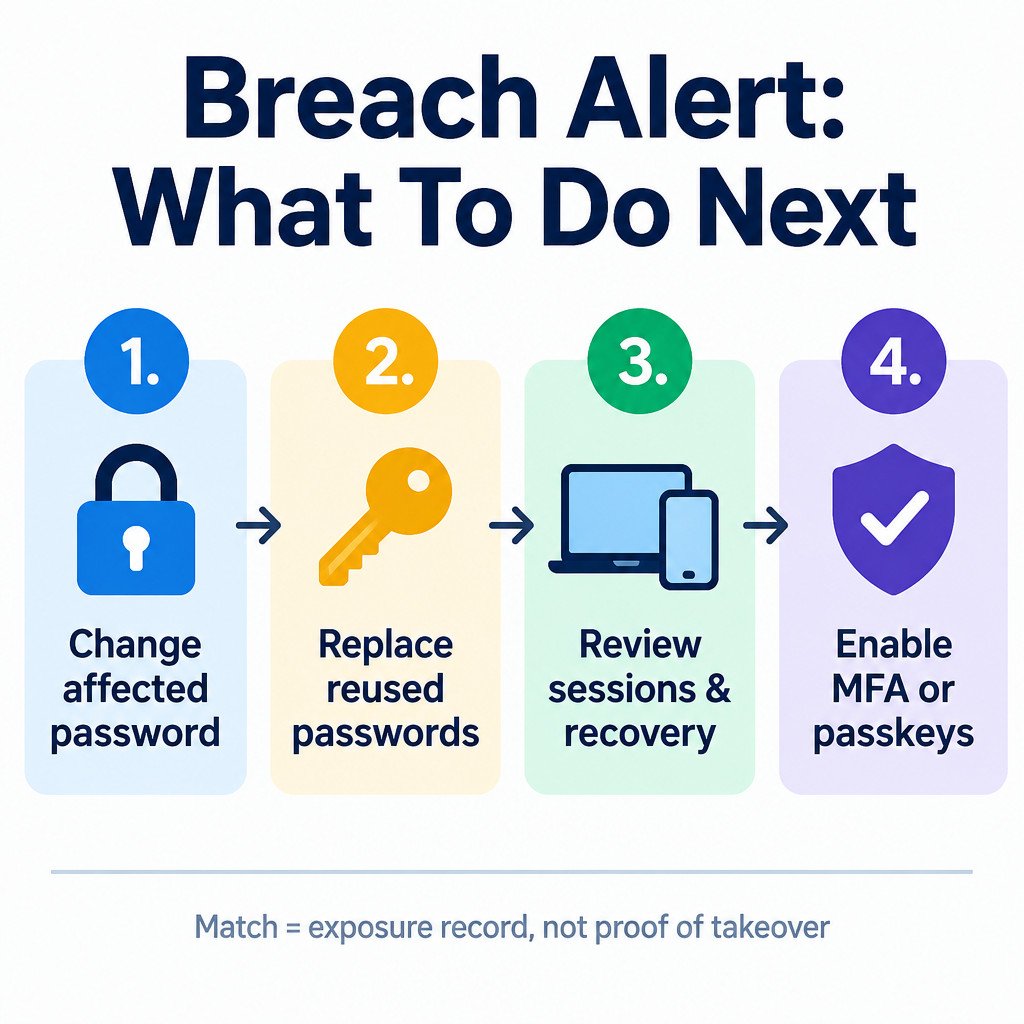
What to do after a breach match
Prioritize the affected service first, particularly if it is an email, financial, work, cloud-storage, or password-manager account. Sign in by typing the known address of the service yourself or using a trusted bookmark; do not follow an unexpected alert link.
- Change the affected account’s password. Create a new, long, unique password with a password manager. Do not make a small variation of the old one.
- Find password reuse. If the former password was used anywhere else, change it at every other site, starting with email and accounts that can reset other passwords.
- Review account security. Check recent sign-ins, active sessions or devices, forwarding rules where relevant, recovery email addresses, recovery phone numbers, and connected applications. Remove anything you do not recognize.
- Turn on stronger sign-in protection. Enable multi-factor authentication (MFA), or use passkeys where the service offers them. Save recovery codes in a protected place.
- Watch for follow-up phishing. Breach news often creates a pretext for convincing reset messages. Verify requests independently before entering credentials.
A practical prioritization example
Illustrative example: A reader finds a breach entry for an old shopping site. The reader no longer uses that site, but remembers reusing its former password on a personal email account years ago. The important response is not reopening the shopping account first. It is changing the email password, ending unknown email sessions, confirming recovery details, and then changing every remaining account that used that old password.
This order reflects the practical impact of password reuse. Control of an email inbox can let an attacker request password resets for many unrelated services. A unique password limits a breach at one site from becoming a credential-stuffing attempt elsewhere.
Enable future breach notifications
HIBP also offers notifications for an address. Submit the address, then complete the verification link sent to that inbox; alerts are not enabled until that verification is completed. The process is described on the HIBP notification page.
Notifications are a useful early warning, not proof of an active intrusion and not a guarantee that every breach will be found. If a message claiming to be an alert arrives unexpectedly, check the sender and visit HIBP directly rather than relying on the email link.
Use password checks without revealing a password
HIBP’s Pwned Passwords service checks whether a password has appeared in breach data. A match means the password should not be used, even if the associated account is not listed in an email search. Do not paste a password into a support ticket, chat, screenshot, or any form you do not fully trust.
HIBP says its range-search method hashes the password locally, sends only the first five characters of the SHA-1 hash, and compares the remaining values locally. That design means the complete password and complete hash are not sent to the service during the check. Details are available on the Pwned Passwords page.
A password that does not match this dataset is not automatically strong, private, or safe to reuse. Make every important account password unique. NIST’s digital identity guidance similarly recommends that password systems check newly chosen passwords against lists of commonly used or compromised values and require a different password when there is a match. See NIST SP 800-63B.
Privacy and limits to keep in mind
- A breach result is historical information. Changing a password improves security but does not erase the record from HIBP.
- Some breach categories have restricted visibility, so results can vary according to the type of data and account context.
- Notification subscriptions necessarily involve HIBP storing the subscribed email address, subscription date, and a verification token. Decide whether that tradeoff is acceptable for each address.
- For employer-managed accounts, internal incident procedures take priority over a personal checklist.
The verdict: HIBP is a worthwhile website for checking exposure and receiving future breach notices. Its value comes from what you do next: replace exposed or reused passwords, protect important accounts with MFA or passkeys, review suspicious activity, and use your organization’s reporting process when work systems are involved.