When Docker Compose appears to ignore a variable, treat it as one of two different problems: Compose may have substituted the wrong value while building its configuration, or the right Compose configuration may have passed the wrong environment into the container. The fastest way to separate them is to render the final model before changing or restarting anything.
docker compose config
docker compose config --environment
docker compose config parses, merges, resolves, and renders the Compose model. docker compose config --environment shows the environment Compose uses for interpolation. Docker documents both commands and their related options in the docker compose config reference. Treat their output as sensitive when it contains connection strings, tokens, or passwords: do not paste it into a public issue, chat, or ticket.
The distinction that prevents most mistakes
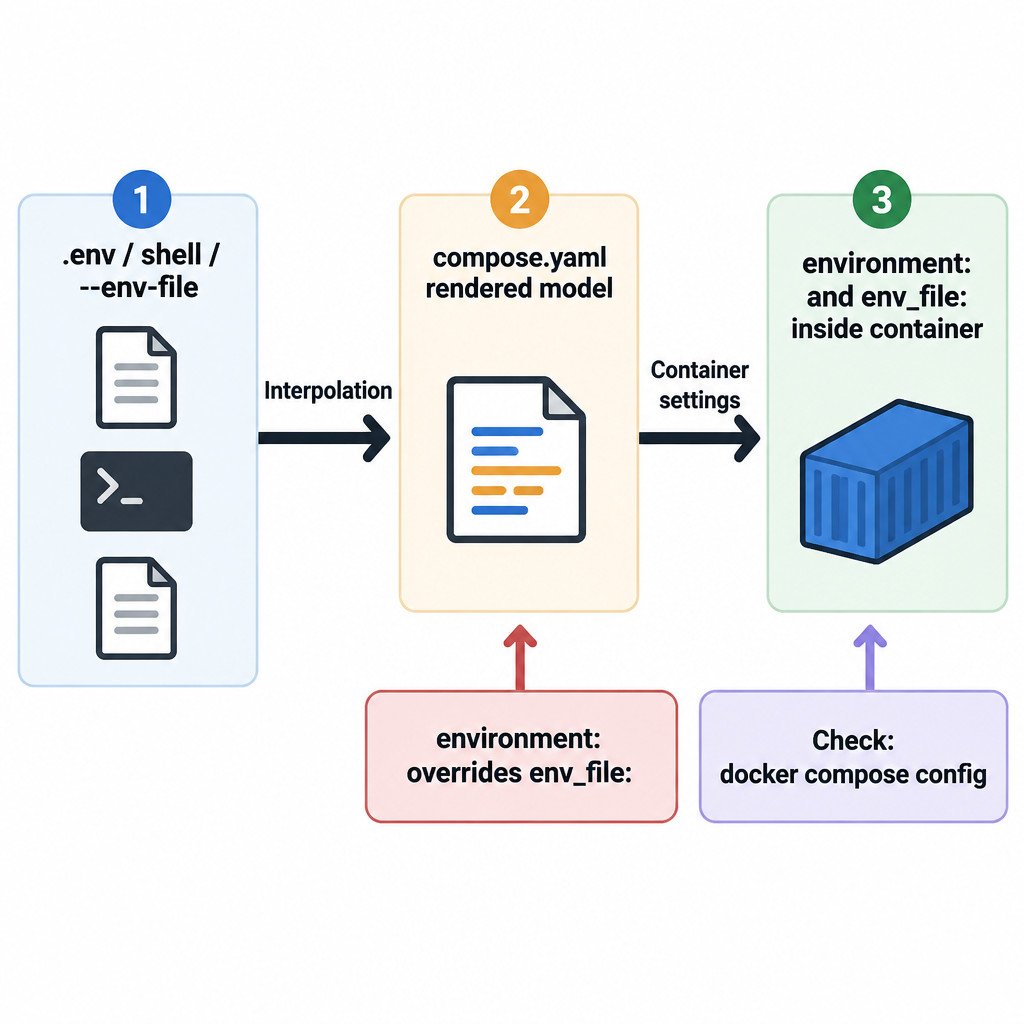
Interpolation happens before a container starts. It is the process Compose uses to replace expressions such as ${IMAGE_TAG} in a Compose file. A project .env file is commonly used for this purpose, along with values from the shell and an explicitly selected --env-file.
The container environment is what a running service receives as environment variables. It is set with service-level environment:, env_file:, image defaults, or command-level overrides. A .env file used for interpolation is not automatically injected into every container. Docker’s interpolation documentation describes these sources and the available substitution forms: Compose variable interpolation.
This guide assumes the current docker compose CLI. It does not cover the legacy docker-compose command or Swarm deployment behavior. Also, a correctly passed variable does not guarantee that an application recognizes it; each application has its own configuration names, formats, and precedence rules.
Use a small mental model for .env, environment, and env_file
The following fictional files show three separate jobs. The names and values are illustrative.
# .env - values Compose uses while rendering compose.yaml
IMAGE_TAG=1.4
HOST_PORT=8080
DATABASE_URL=postgresql://app:example@db:5432/app
# app.env - values intended for the api container
LOG_LEVEL=info
APP_MODE=development# compose.yaml
services:
api:
image: example/api:${IMAGE_TAG:?set IMAGE_TAG}
ports:
- "${HOST_PORT}:8080"
env_file:
- ./app.env
environment:
APP_MODE: production
DATABASE_URL: ${DATABASE_URL:?set DATABASE_URL}In this example, .env supplies values for the image tag, host port, and interpolated database URL. The env_file entry sends LOG_LEVEL and APP_MODE to the api container. But the explicit environment: entry sets APP_MODE=production, so it overrides APP_MODE=development from app.env.
That last rule is a frequent source of confusion: for a container variable declared in both places, an explicit environment: value wins over an env_file: value. Command-line overrides such as docker compose run -e NAME=value have still higher precedence for that run. Docker’s documented precedence table explains the fuller ordering and its interpolation-related cases: Environment variable precedence in Docker Compose.
A diagnostic sequence that avoids guesswork
- Work from the intended project context. Change to the directory you expect, or name the Compose file explicitly with
-f path/to/compose.yaml. If this is not the default environment, select its file explicitly with--env-file path/to/file. - Render the model. Run
docker compose config. Check the resulting image, ports, volumes, andenvironmententries rather than reading only the source YAML. - Inspect interpolation inputs. Run
docker compose config --environment. Look for an unexpected shell value or a missing value. - Find every declaration. Search the Compose files,
env_filefiles, and command history for the affected variable. A value can be used to interpolate YAML without being present inside the container. - Remove accidental overrides. Close or unset an unintended shell variable, correct the selected env file, then render again.
- Restart only after the rendered values are right. If they are right but the application still behaves incorrectly, move to that application’s own logs and configuration documentation.
Make missing settings fail early
A plain expression such as ${DATABASE_URL} can resolve to an empty value when the variable is unavailable, creating a broken or misleading configuration. For values that must exist, use required-variable syntax:
DATABASE_URL: ${DATABASE_URL:?set DATABASE_URL before starting Compose}The :? form stops Compose and prints the supplied message when the variable is unset or empty. It is particularly useful for image tags, published ports, hostnames, and mandatory application connection settings. It converts a quiet bad substitution into a visible setup error.
Common failure patterns and the right check
| Symptom | Likely boundary to inspect | Useful next action |
|---|---|---|
| Wrong image tag or host port | Compose-time interpolation | Compare docker compose config with docker compose config --environment. |
Application does not see a setting from .env | Container environment | Add the setting under environment: or reference an env_file: for that service. |
A value in env_file has no effect | Service-level override | Check for the same name in environment: and for a command-level -e override. |
| A configuration works on one machine only | Shell or selected-file difference | Use an explicit --env-file path and render the model on both machines. |
| Compose starts but the app still fails | Application configuration | Verify the exact variable name, expected format, and application logs. |
Keep credentials out of routine environment files
Environment variables are convenient for non-secret settings, but they are a poor default for passwords, API tokens, and similar credentials. Docker advises against using environment variables for sensitive information and points to secrets instead. The appropriate secrets mechanism depends on where the workload runs, so treat this as a design direction rather than a complete deployment recipe: Set environment variables within your container’s environment.
A repeatable Compose pre-flight check
- Use an explicit
--env-filepath for staging, production, or any non-default environment. - Keep service-facing settings near the service through
environment:or a clearly namedenv_file:. - Use
${VARIABLE:?message}for values that must not be blank. - Run
docker compose configbefore applying a changed stack. - Use
docker compose config --environmentwhen interpolation is suspect, and handle its output as sensitive. - After Compose is correct, diagnose remaining issues as application-level configuration or connectivity problems.
The key is to prove the value at each boundary. First confirm what Compose rendered. Then confirm which mechanism is meant to place a value in a specific container. This makes shell overrides, misplaced files, and duplicate declarations visible before they become a misleading runtime problem.