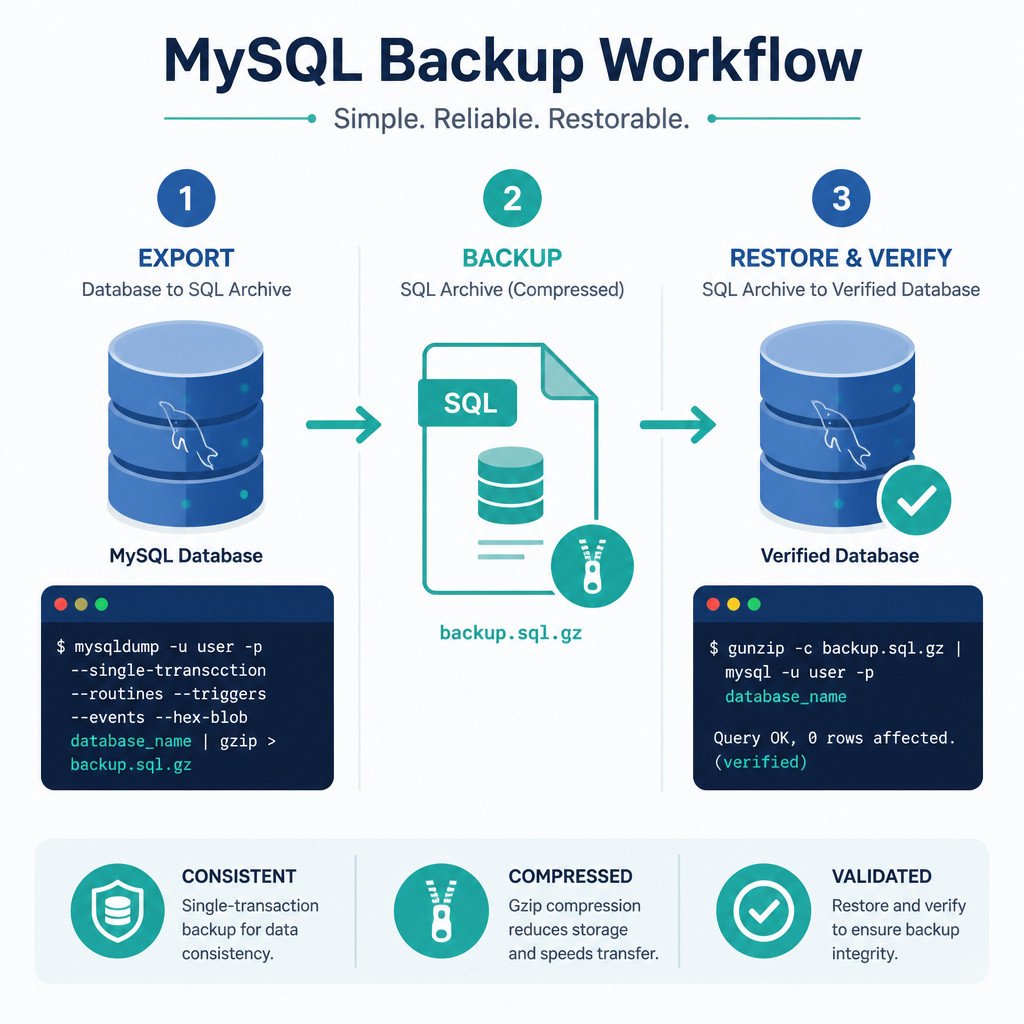
Quick answer: Export a MySQL database to an SQL file with mysqldump, then restore it using the mysql client. For an InnoDB database, include --single-transaction to create a consistent backup without locking tables for the entire export.
mysqldump -u root -p --single-transaction --quick --routines --events --databases appdb > appdb.sql
mysql -u root -p < appdb.sql
Using -p prompts you for the password, so it isn’t exposed in your shell history or process list. Since the backup command includes --databases appdb, the resulting dump contains the statements needed to create and select the database during restoration.
What mysqldump includes
mysqldump produces a logical backup made up of SQL statements that recreate database objects and data. It comes with the standard MySQL client tools and works well for portable backups, migrations, development copies, and small-to-medium databases.
- Tables and their data are included by default.
- Triggers are also included by default.
- Stored procedures and functions require
--routines. - Scheduled events require
--events. - Database users and server configuration aren’t included in a normal application-database dump.
Physical backup tools may restore more quickly on very large or heavily used systems. A logical dump doesn’t provide point-in-time recovery on its own either. For that, it must be combined with MySQL binary logs.
Prerequisites
- Install the MySQL client tools on the computer where you’ll run the commands.
- Check that
mysqldump --versionandmysql --versionboth work. - Use an account that has permission to read the required tables and database objects.
- Make sure the destination has enough free space for the dump file.
You can run these commands from Command Prompt, PowerShell, or a Linux or macOS terminal. For a remote database, add -h hostname and, if needed, -P port.
How to back up one MySQL database
- Open a terminal on a computer that can connect to the MySQL server.
- Run mysqldump with the database name and the options you need.
- Enter the password when prompted.
- Check the exit status and output file before considering the backup successful.
mysqldump -h localhost -u backup_user -p \
  --single-transaction \
  --quick \
  --routines \
  --events \
  --databases appdb > appdb.sql
The --single-transaction option creates a consistent snapshot for transactional tables such as InnoDB. Meanwhile, --quick retrieves rows incrementally instead of buffering a whole table in memory.
Don’t make schema changes such as ALTER TABLE, DROP TABLE, or TRUNCATE TABLE while the dump is running. Keep in mind that --single-transaction can’t guarantee a consistent snapshot for nontransactional tables such as MyISAM.
Back up without CREATE DATABASE statements
To restore the dump under a different database name, leave out --databases:
mysqldump -u backup_user -p --single-transaction appdb > appdb.sqlBack up every database
mysqldump -u root -p --single-transaction --routines --events --all-databases > all-databases.sqlCheck all-database dumps carefully before restoring them on another server. They may include system-schema data that shouldn’t be copied blindly between different MySQL versions or environments.
How to restore a mysqldump backup
When the dump was created with --databases, you can restore it directly:
mysql -u root -p < appdb.sqlIf it doesn’t contain CREATE DATABASE and USE statements, create the destination database first, then name it in the import command:
mysql -u root -p -e "CREATE DATABASE restored_appdb"
mysql -u root -p restored_appdb < appdb.sql
When restoring to a remote server, include the host and port:
mysql -h db.example.net -P 3306 -u restore_user -p < appdb.sqlDepending on the statements stored in the dump, a restore may overwrite existing objects or conflict with them. Test the process in a nonproduction environment, and keep a current backup before replacing production data.
Compress the backup with gzip
SQL dump files tend to compress well. On Linux and macOS, send the output through gzip:
mysqldump -u backup_user -p --single-transaction --routines --events appdb | gzip > appdb.sql.gzYou can restore the compressed file without permanently extracting it:
gunzip -c appdb.sql.gz | mysql -u root -p restored_appdbIn this backup command, --databases wasn’t used. That means the target database must already exist before you start the restore.
How to verify the backup and restore
- Check that the command finished without displaying an error.
- Confirm that the dump file exists and has a plausible, nonzero size.
- Look at the beginning and end of the SQL file for signs of truncation or obvious errors.
- Restore the backup to a temporary database or test server.
- Compare counts for critical tables and run representative application queries.
mysql -u root -p -e "SELECT COUNT(*) FROM restored_appdb.orders;"
mysql -u root -p -e "SHOW TABLES FROM restored_appdb;"
The presence of a file on disk doesn’t prove that it can be restored. Regular test restores are the most dependable way to confirm that your backup process works.
Common mysqldump mistakes
- Writing the password on the command line: Use
-pby itself rather than placing the password after it. - Leaving out routines or events: Include
--routines --eventsif the application relies on them. - Assuming every storage engine is transactional: Look for MyISAM and other nontransactional tables before depending on
--single-transaction. - Overlooking stderr and exit codes: A failed dump may still leave a partially written file behind.
- Skipping restoration tests: Schedule test restores and document the recovery steps you’ll need.
- Storing backups only on the same server: Keep protected copies on separate infrastructure, with suitable retention and encryption controls.
FAQ
Does mysqldump lock MySQL tables?
That depends on the selected options and storage engines. With --single-transaction, mysqldump can create a consistent snapshot of InnoDB tables without holding read locks for the full duration of the dump. Nontransactional tables don’t have the same guarantee.
Does mysqldump include stored procedures and triggers?
Triggers are included by default. Use --routines to include stored procedures and functions, and add --events for Event Scheduler definitions.
Can I restore a mysqldump file under another database name?
Yes. Create the new database, then import a dump that was made without --databases. If the SQL file has explicit CREATE DATABASE or USE statements, review or edit them before importing it under a different name.
Is copying the MySQL data directory the same as using mysqldump?
No. Copying live database files without a supported physical-backup process may result in an inconsistent or unusable copy. By contrast, mysqldump creates a logical SQL backup through the server, making it safer for straightforward exports and migrations.