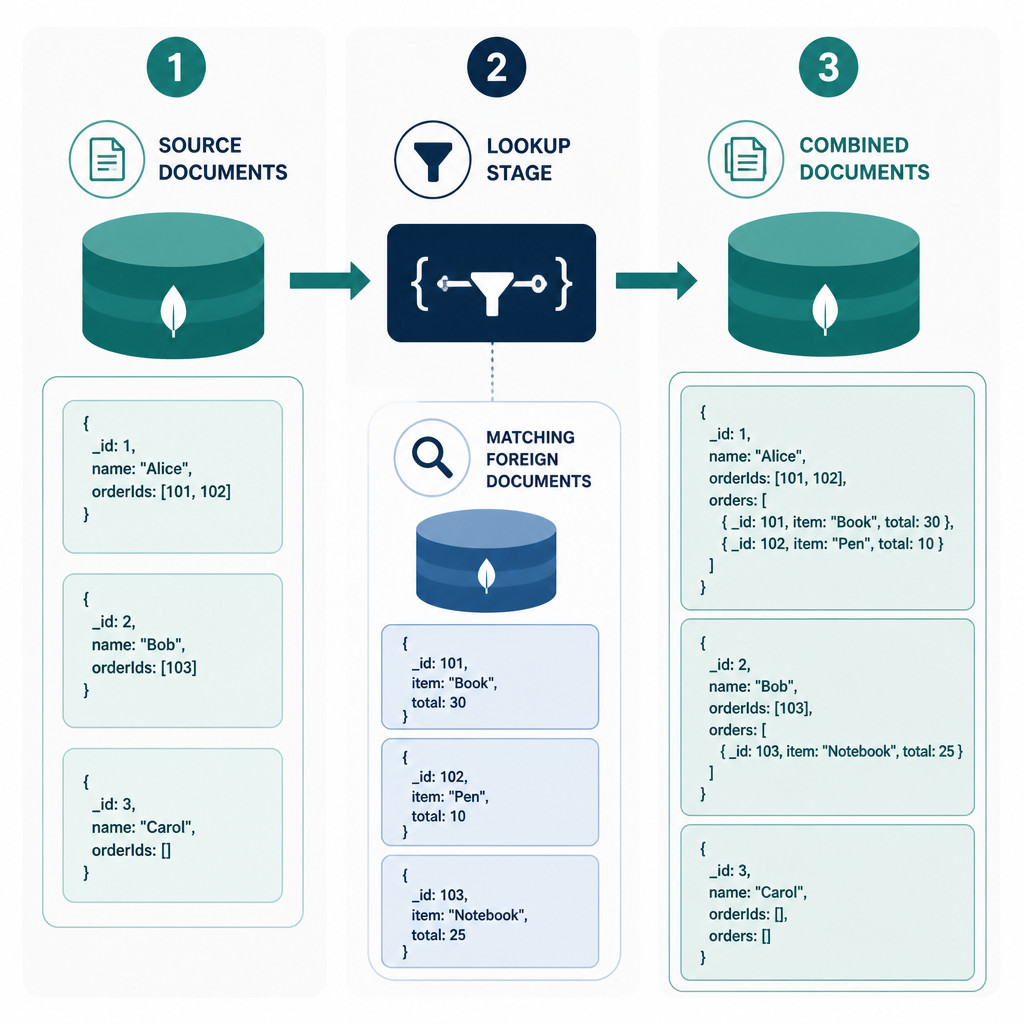
MongoDB’s $lookup aggregation stage joins documents from one collection to matching documents in another. It adds those matches to each input document as an array.
For a basic equality join, provide the foreign collection, the fields to match in both collections, and the name of the resulting array:
db.orders.aggregate([
  {
    $lookup: {
      from: "customers",
      localField: "customerId",
      foreignField: "_id",
      as: "customer"
    }
  }
])
Here, MongoDB matches orders.customerId against customers._id. Each order gets a customer array containing every matching customer document. For efficient lookups, create an index on the foreign field, particularly when you’re joining on something other than the automatically indexed _id field.
Example collections
The examples below use an orders collection and a customers collection:
db.customers.insertMany([
  { _id: 1, name: "Ava", status: "active", tier: "gold" },
  { _id: 2, name: "Noah", status: "inactive", tier: "silver" }
])

db.orders.insertMany([
  { _id: 101, customerId: 1, total: 120, state: "paid" },
  { _id: 102, customerId: 1, total: 75, state: "pending" },
  { _id: 103, customerId: 2, total: 40, state: "paid" },
  { _id: 104, customerId: 99, total: 25, state: "paid" }
])
Join MongoDB collections with a basic $lookup
Run the aggregation on the collection containing the documents you want to keep. In this case, MongoDB retains every order, even when it can’t find a matching customer:
db.orders.aggregate([
  {
    $lookup: {
      from: "customers",
      localField: "customerId",
      foreignField: "_id",
      as: "customer"
    }
  }
])
Order 104 doesn’t have a matching customer, so its customer value is an empty array. This is similar to a left outer join in a relational database.
Turn the joined array into an object with $unwind
A $lookup always produces an array. Even a one-to-one relationship returns output such as customer: [{...}]. If you want one embedded customer object instead, add $unwind:
db.orders.aggregate([
  {
    $lookup: {
      from: "customers",
      localField: "customerId",
      foreignField: "_id",
      as: "customer"
    }
  },
  { $unwind: "$customer" }
])
By default, $unwind removes any orders with an empty customer array. To keep unmatched orders, use this form:
{
  $unwind: {
    path: "$customer",
    preserveNullAndEmptyArrays: true
  }
}
Filter joined documents with a $lookup pipeline
Use the pipeline form of $lookup when your join needs several conditions, expressions, sorting, or field selection. The let option makes values from the current input document available as variables. Inside the nested pipeline, those variable names begin with a double dollar sign.
The following query joins only active customers whose ID matches the order’s customerId:
db.orders.aggregate([
  {
    $lookup: {
      from: "customers",
      let: { orderCustomerId: "$customerId" },
      pipeline: [
        {
          $match: {
            $expr: {
              $and: [
                { $eq: ["$_id", "$$orderCustomerId"] },
                { $eq: ["$status", "active"] }
              ]
            }
          }
        },
        {
          $project: {
            _id: 1,
            name: 1,
            tier: 1
          }
        }
      ],
      as: "customer"
    }
  }
])
The query needs $expr because it compares a field with a variable rather than comparing a field with a fixed query value. The final $project keeps the returned customer data limited to the required fields.
Match documents after the join
Put $match after $lookup when your condition depends on the joined data. For instance, this pipeline returns paid orders from gold-tier customers:
db.orders.aggregate([
  { $match: { state: "paid" } },
  {
    $lookup: {
      from: "customers",
      localField: "customerId",
      foreignField: "_id",
      as: "customer"
    }
  },
  { $unwind: "$customer" },
  { $match: { "customer.tier": "gold" } },
  {
    $project: {
      _id: 1,
      total: 1,
      "customer.name": 1,
      "customer.tier": 1
    }
  }
])
Filtering the source documents before $lookup means MongoDB has fewer joins to perform. That’s why the pipeline matches state: "paid" first.
Improve $lookup performance
- Index the foreign join field: An equality lookup on
foreignFieldworks best when that field has an index. MongoDB indexes the_idfield automatically. - Filter early: Place selective
$matchstages before$lookupwhenever the conditions apply to the source collection. - Return only the fields you need: Use
$projectinside the lookup pipeline or after the join to keep document sizes down. - Avoid unbounded joined arrays: One-to-many joins may create large documents and use a substantial amount of memory.
- Check that BSON types match: The string
"1"isn’t equal to the number1. Likewise, a string containing an ObjectId value doesn’t equal an actualObjectId.
If you’re joining by customer email instead of _id, for example, create an index on the foreign collection:
db.customers.createIndex({ email: 1 })Check the execution plan
Run explain with execution statistics to see how MongoDB processes the aggregation:
db.orders.explain("executionStats").aggregate([
  {
    $lookup: {
      from: "customers",
      localField: "customerId",
      foreignField: "_id",
      as: "customer"
    }
  }
])
Review the reported stages along with the documents examined, keys examined, and execution time. Use production-like data volumes for testing, since a join that runs quickly on a small sample may perform quite differently against a large collection.
Common $lookup problems
The joined array is empty
Verify the collection name, field names, stored values, and BSON types. Also make sure from contains the real collection name, not a model name defined by an application framework.
$unwind removes unmatched documents
Set preserveNullAndEmptyArrays to true when unmatched source documents need to remain in the result set.
The query slows down as data grows
Index the foreign join field and filter source documents before the join. Don’t return fields you don’t need. For relationships that are accessed frequently, consider whether embedding a small, bounded set of data would be a better fit than repeatedly joining collections.
Frequently asked questions
Is MongoDB $lookup the same as a SQL join?
It offers similar join behavior within an aggregation pipeline. A standard $lookup behaves like a left outer join and places matching foreign documents in an array.
Can $lookup join more than two collections?
Yes. You can add several $lookup stages to one aggregation pipeline. Each new join may increase the query cost, so filter early and check performance.
Why does $lookup return an array?
One source document may match several foreign documents, so MongoDB always stores the matches in an array. Use $unwind if you need one output document for each match.
Can $lookup join fields with different data types?
Not with a direct equality match. Convert or normalize the values so both fields use compatible BSON types. A consistent schema is preferable to converting values every time the query runs.