MongoDB schema validation can reject documents that don’t match the structure required by a collection. With the $jsonSchema operator, you can make fields mandatory, enforce BSON data types, limit values to an approved set, and validate nested objects and arrays.
When creating a collection, define its validator with db.createCollection(). For a collection that already exists, add or update validation through the collMod command. A safer production rollout generally begins with validationAction: “warn”. After cleaning up existing data, you can switch to validationAction: “error”.
Create a collection with $jsonSchema validation
This example creates a users collection. Each document must include an email address, account status, and creation date. The age field is optional, but when provided, it must be a non-negative integer.
db.createCollection("users", {
  validator: {
    $jsonSchema: {
      bsonType: "object",
      title: "User document validation",
      required: ["email", "status", "createdAt"],
      properties: {
        email: {
          bsonType: "string",
          description: "Email must be a string and is required"
        },
        status: {
          enum: ["active", "inactive", "suspended"],
          description: "Status must use an allowed value"
        },
        age: {
          bsonType: ["int", "long"],
          minimum: 0,
          description: "Age must be a non-negative integer"
        },
        createdAt: {
          bsonType: "date",
          description: "createdAt must be a BSON date"
        }
      }
    }
  },
  validationLevel: "strict",
  validationAction: "error"
})
The required array determines which fields must be present. Rules for individual fields belong under properties. Because MongoDB checks BSON types, use bsonType rather than treating JSON and BSON types as if they were identical.
Add validation to an existing MongoDB collection
If the collection already exists, use collMod. It updates the collection configuration without requiring you to recreate the collection.
db.runCommand({
  collMod: "users",
  validator: {
    $jsonSchema: {
      bsonType: "object",
      required: ["email", "status", "createdAt"],
      properties: {
        email: { bsonType: "string" },
        status: { enum: ["active", "inactive", "suspended"] },
        age: { bsonType: ["int", "long"], minimum: 0 },
        createdAt: { bsonType: "date" }
      }
    }
  },
  validationLevel: "strict",
  validationAction: "error"
})
Adding a validator doesn’t repair or remove older documents automatically. Invalid documents remain in the collection. Under strict validation, however, later updates can fail unless the resulting document meets the defined rules.
Test valid and invalid documents
Start by inserting a document that satisfies every required rule:
db.users.insertOne({
  email: "alex@example.com",
  status: "active",
  age: NumberInt(32),
  createdAt: new Date()
})
The next insert fails for two reasons. The status value isn’t allowed, and createdAt is a string rather than a BSON date.
db.users.insertOne({
  email: "sam@example.com",
  status: "pending",
  createdAt: "2025-01-15"
})
MongoDB returns a document validation failure. On supported versions, the error details can show which fields and validation rules weren’t satisfied.
Choose a validation level and action
validationLevel
- strict: Validation applies to every insert and update. It’s the default and usually the best final setting for most collections.
- moderate: Validation applies to inserts and to updates of documents that already meet the validation rules. This setting can help during a migration while invalid legacy documents are still present.
- off: Validation is disabled, but MongoDB keeps the validator definition.
validationAction
- error: MongoDB rejects writes that violate the validator. This is the default behavior.
- warn: MongoDB allows the write and records a validation warning. Warning mode lets you observe how new rules affect writes before enforcing them.
Roll out validation safely on production data
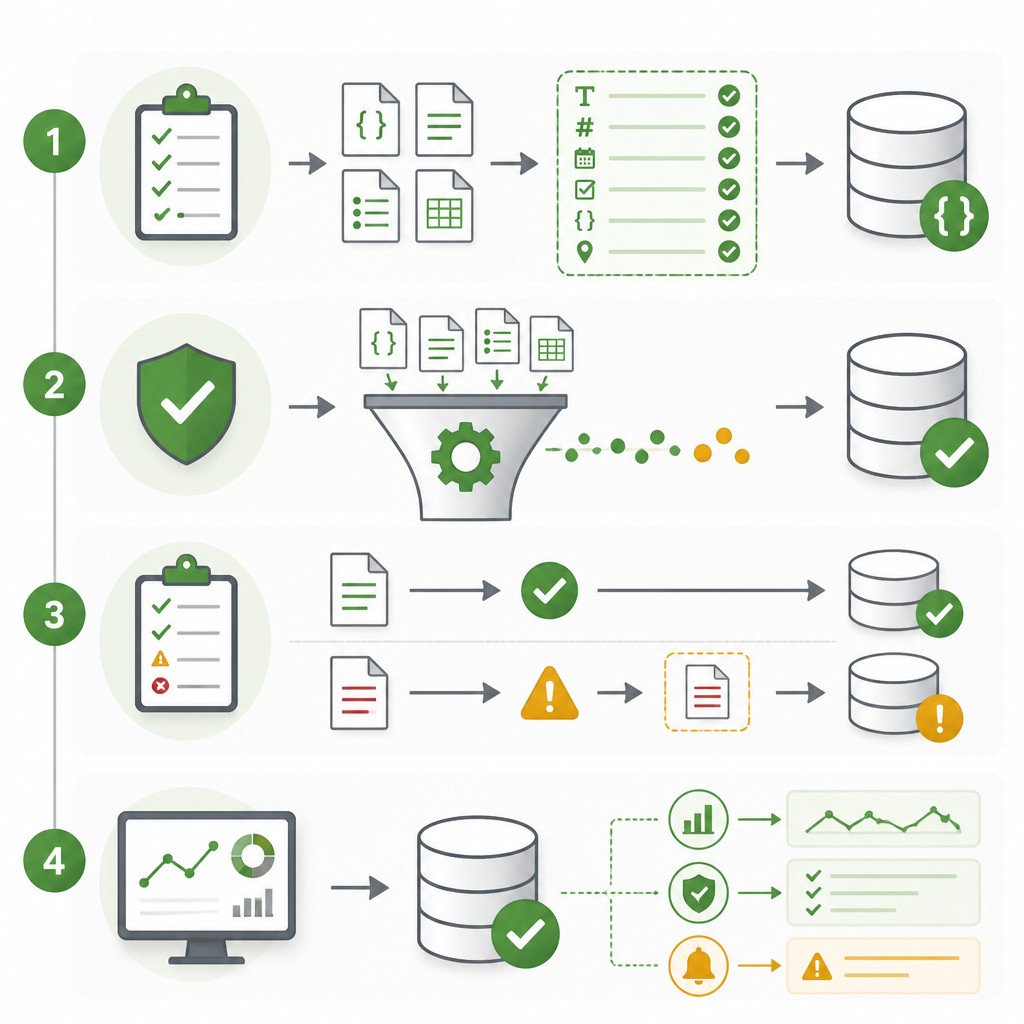
- Define the intended schema. Add only the rules your application actually requires.
- Find nonconforming documents. Check the collection against the proposed schema before turning on enforcement.
- Begin in warning mode. Apply the validator with validationAction: “warn”.
- Clean up legacy data. Fix missing fields, incorrect types, and values that aren’t supported.
- Test every writer. Verify applications, background jobs, imports, and administrative scripts.
- Turn on error mode. Change the action to error once you’ve confirmed that valid writes continue to work normally.
In mongosh, you can save a proposed schema in a variable, then search for documents that don’t match it:
const userSchema = {
  bsonType: "object",
  required: ["email", "status", "createdAt"],
  properties: {
    email: { bsonType: "string" },
    status: { enum: ["active", "inactive", "suspended"] },
    createdAt: { bsonType: "date" }
  }
}

db.users.find({
  $nor: [{ $jsonSchema: userSchema }]
})
Validate nested objects and arrays
For embedded documents, place another properties definition inside the parent field. Use items to define rules for array elements:
db.runCommand({
  collMod: "users",
  validator: {
    $jsonSchema: {
      bsonType: "object",
      required: ["email", "roles"],
      properties: {
        email: { bsonType: "string" },
        profile: {
          bsonType: "object",
          properties: {
            displayName: { bsonType: "string" },
            timezone: { bsonType: "string" }
          }
        },
        roles: {
          bsonType: "array",
          uniqueItems: true,
          items: {
            enum: ["reader", "editor", "admin"]
          }
        }
      }
    }
  },
  validationAction: "error"
})
Common MongoDB schema validation mistakes
- Using string dates: A value such as “2025-01-15” is still a string, not a BSON date. Create dates with new Date() or the matching type provided by your driver.
- Confusing validation with uniqueness: $jsonSchema can require email to be a string, but it can’t guarantee that every email address is unique. You need a separate unique index for that.
- Setting additionalProperties incorrectly: If you use additionalProperties: false, every permitted field must appear under properties, including _id.
- Enforcing rules before checking the data: Existing documents with inconsistent values may cause application updates to fail unexpectedly.
- Overvalidating flexible fields: Rules that are too rigid can make ordinary schema changes more difficult. Focus validation on business-critical constraints instead of every incidental field.
FAQ
Does MongoDB have a fixed schema?
MongoDB collections are flexible by default. When a fixed structure or value constraint is needed, collection validators can enforce it.
Does schema validation check existing documents immediately?
No. Applying a validator doesn’t automatically scan, change, or delete existing documents. Audit older data separately before enabling strict enforcement.
Can MongoDB schema validation enforce a unique email address?
No. Uniqueness requires a unique index, such as db.users.createIndex({ email: 1 }, { unique: true }). Schema validation and indexes address different requirements.
How do I remove a MongoDB validator?
Run collMod with an empty validator:
db.runCommand({
  collMod: "users",
  validator: {}
})