To create a MySQL user and grant permissions, sign in with an administrative account, run CREATE USER, and assign the required database privileges with GRANT. This MySQL 8.0 example creates a local application account that can read and modify one database:
CREATE USER 'appuser'@'localhost' IDENTIFIED BY 'use-a-strong-password';
GRANT SELECT, INSERT, UPDATE, DELETE ON appdb.* TO 'appuser'@'localhost';
SHOW GRANTS FOR 'appuser'@'localhost';
Before running these statements, replace the username, host, password, and database name. Stick to the permissions the account actually needs instead of granting global privileges.
Prerequisites
- A running MySQL server and access to the MySQL command-line client.
- An administrative account that can create users and grant privileges.
- The name of the database the new account needs to access.
- A strong, unique password for the account.
Sign in with an administrative account:
mysql -u root -pOn Ubuntu and similar systems, the root account may use socket authentication. In that case, you might need:
sudo mysqlCreating a MySQL User and Granting Permissions
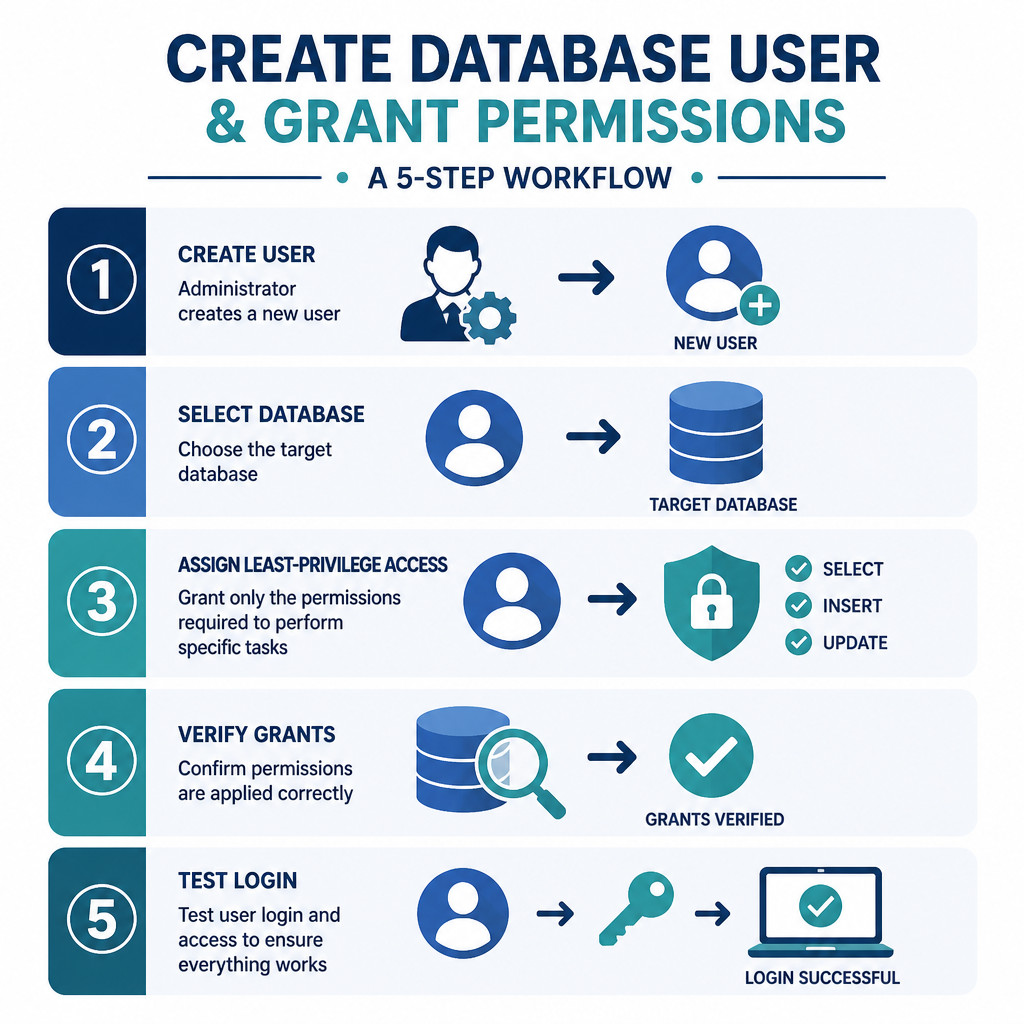
1. Create the database if needed
If the database already exists, skip this step. The backticks protect identifiers that contain special characters or match reserved words.
CREATE DATABASE `appdb` CHARACTER SET utf8mb4 COLLATE utf8mb4_0900_ai_ci;This collation is available in MySQL 8.0. If you’re using an older MySQL release or MariaDB, choose a supported utf8mb4 collation instead.
2. Create the user account
CREATE USER 'appuser'@'localhost' IDENTIFIED BY 'use-a-strong-password';Every MySQL account includes both a username and a host. Here, ‘appuser’@’localhost’ can authenticate only from the database server itself.
When an application connects from a specific remote server, use that server’s IP address:
CREATE USER 'appuser'@'192.0.2.25' IDENTIFIED BY 'use-a-strong-password';Using % as the host permits connections that match any host. Avoid it unless the use case and network controls require it. Keep in mind that creating a remote account doesn’t expose MySQL by itself. Connectivity also depends on the server’s bind address, firewall, routing, and TLS configuration.
3. Grant the necessary privileges
A typical application that reads and changes existing rows can use database-level permissions:
GRANT SELECT, INSERT, UPDATE, DELETE
ON `appdb`.*
TO 'appuser'@'localhost';
An application that runs schema migrations may also need privileges such as CREATE, ALTER, INDEX, or DROP. Rather than giving destructive schema permissions to the normal runtime account, consider creating a separate migration account.
GRANT CREATE, ALTER, INDEX, DROP
ON `appdb`.*
TO 'migrationuser'@'localhost';
4. Verify the permissions
SHOW GRANTS FOR 'appuser'@'localhost';The result should identify the account and show its privileges on appdb.*. After signing in as the new user, you can also check the currently authenticated account and view its grants:
SELECT CURRENT_USER();
SHOW GRANTS;
5. Test the account
Leave the administrative session, then connect as the new user:
EXIT;
mysql -u appuser -p -h localhost appdb
Try an operation that should be permitted:
SHOW TABLES;Don’t stop after confirming that allowed operations work. Test an operation that wasn’t granted as well. For instance, an account with privileges only on appdb shouldn’t be able to create objects in an unrelated database.
Useful MySQL Permission Examples
Grant read-only access
GRANT SELECT ON `appdb`.* TO 'reportuser'@'localhost';Grant access to one table
GRANT SELECT, UPDATE
ON `appdb`.`customers`
TO 'supportuser'@'localhost';
Grant all privileges on one database
GRANT ALL PRIVILEGES ON `appdb`.* TO 'dbadmin'@'localhost';This gives the account all currently available privileges at the database scope. It doesn’t provide administrative control over the entire MySQL server. Use this grant only if the account truly needs full control of that database.
Grant privileges on every database
GRANT ALL PRIVILEGES ON *.* TO 'serveradmin'@'localhost' WITH GRANT OPTION;Use this statement with extreme care. It creates a highly privileged account. The WITH GRANT OPTION clause also lets that account grant its privileges to other users, making it unsuitable for normal application accounts.
Revoking Permissions or Deleting a User
To remove selected database privileges without deleting the account, run:
REVOKE INSERT, UPDATE, DELETE
ON `appdb`.*
FROM 'appuser'@'localhost';
You can remove every privilege and grant option assigned to the account with:
REVOKE ALL PRIVILEGES, GRANT OPTION
FROM 'appuser'@'localhost';
Once the account is no longer needed, delete it completely:
DROP USER 'appuser'@'localhost';Common Mistakes
- Using the wrong host: MySQL treats ‘user’@’localhost’ and ‘user’@’192.0.2.25’ as separate accounts.
- Granting global access: Whenever possible, use database.* or database.table rather than *.*.
- Adding WITH GRANT OPTION unnecessarily: This allows the user to pass privileges to other accounts.
- Running FLUSH PRIVILEGES after CREATE USER or GRANT: Account-management statements don’t require it. FLUSH PRIVILEGES is generally needed only after editing the grant tables directly, which is discouraged.
- Testing only authentication: A successful login doesn’t confirm that the user has the right permissions or that excessive access is blocked.
Best Practices for MySQL Users
- Use separate accounts for applications, administrators, reporting tools, backups, and schema migrations.
- Follow least privilege by granting access only to the required databases, tables, and operations.
- Where practical, restrict each account to a specific host or trusted network range.
- Keep application credentials in a protected secret manager or environment configuration, never in source control.
- Require encrypted connections for remote database traffic and restrict port 3306 with a firewall.
- Review accounts and permissions regularly with SHOW GRANTS.
Frequently Asked Questions
How do I create a MySQL user and grant permissions to one database?
Use CREATE USER with the required username and host. Then run GRANT at the database scope:
CREATE USER 'newuser'@'localhost' IDENTIFIED BY 'strong-password';
GRANT SELECT, INSERT, UPDATE, DELETE ON `mydb`.* TO 'newuser'@'localhost';
Does GRANT create a user automatically in MySQL 8.0?
No. MySQL 8.0 requires you to create the account explicitly with CREATE USER before assigning permissions through GRANT.
Do I need FLUSH PRIVILEGES after GRANT?
No. MySQL applies privilege changes immediately when you use CREATE USER, GRANT, REVOKE, or other account-management statements.
How can I see a MySQL user’s permissions?
Run SHOW GRANTS FOR ‘username’@’host’; while signed in with an account that has permission to inspect that user.